I used to forward ports on my router like everyone else. Then one day I realized I had no idea which of those open ports were still supposed to be open, and that bots had been knocking on them within minutes of each going live. So I tore it all down and moved everything to Tailscale. Four machines, zero open ports, and I can reach any of them from anywhere.
This is not a Tailscale tutorial. This is what happened when I actually did it — including the parts that broke.
The Setup: Four Machines, One Private Network
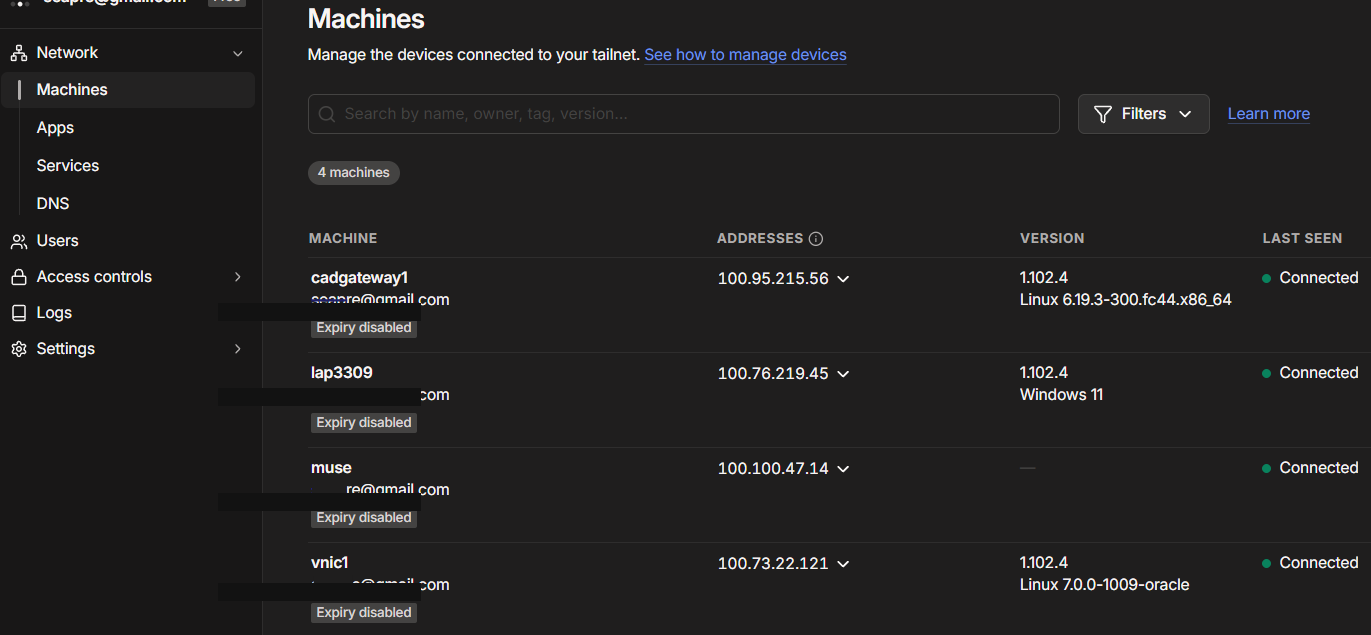
My tailnet has four nodes, each with a job:
- lap3309 (100.76.219.45) — my Windows laptop, WSL2 for Linux work. The daily driver.
- cadgateway1 (100.95.215.56) — a Fedora VM at home, set up as a warm standby. If the laptop sleeps or dies, work fails over here.
- vnic1 (100.73.22.121) — an Oracle Cloud VPS in Toronto. Runs a message relay and a terminal bridge, both bound to the tailnet IP only.
- muse (100.100.47.14) — an ephemeral cloud VM that gets recycled roughly every two hours. It dials home over Tailscale to stay reachable.
No port forwarding on the home router. No DDNS. No firewall rules to maintain. From any node, I can SSH or HTTP directly to any other node’s tailnet IP as if they were on the same LAN.
Why Not Just Forward Ports
I had three concrete reasons, not philosophical ones:
CGNAT made it unreliable anyway. My ISP’s setup meant port forwarding was flaky at best. Tailscale’s NAT traversal just works — it punches through without the router knowing or caring.
Open ports get scanned immediately. This is not theoretical. Every port I ever forwarded started receiving probe traffic within hours. With Tailscale, there is nothing listening on the WAN side at all. The services bind to the tailnet IP (100.x.x.x) exclusively — never 0.0.0.0. From the internet’s perspective, those services do not exist.
One identity, every machine. Port forwarding authenticates by “you reached the right IP:port.” Tailscale authenticates by “you are this device, on this tailnet.” I disabled key expiry on the stable nodes so they stay connected without re-auth, and every connection is WireGuard-encrypted end to end.
What Broke: The Ephemeral VM Problem
The muse node was the hard one. It gets wiped and recycled every ~2 hours by the platform — including /etc, which takes the Tailscale state with it.
My first attempt was naive: install Tailscale, authenticate, hope it survives. It did not survive. Every recycle meant manual re-auth, which defeats the purpose of automation.
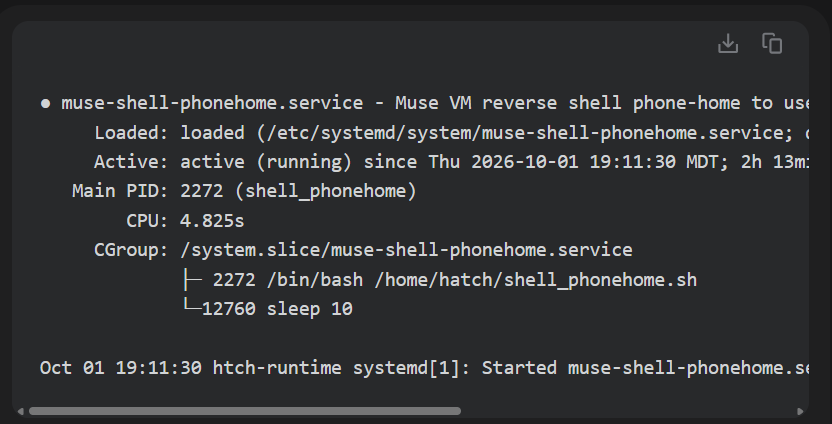
The fix was a phone-home pattern: a systemd service on the VM that dials out to the VPS every 10 seconds, plus a restore script that rebuilds the Tailscale configuration from a surviving home directory after each reboot. A 15-minute watchdog checks the service and rebuilds it if it dropped.
It works, but it taught me something: Tailscale is great for stable nodes and annoying for ephemeral ones. The phone-home pattern is the price of admission for machines that do not persist.
What Broke: The Proxy That Ate Tailnet Traffic
This one took a while to diagnose. From the muse VM, connections to the VPS tailnet IP (100.73.22.121) on ports 8080 and 8090 were silently dropped. The VM’s egress proxy blackholes connections to tailnet IPs — plain HTTP proxy returns empty replies, CONNECT proxy closes with no response.
I initially blamed the VPS. Then I blamed Tailscale. The actual problem was the network path: the VM’s proxy simply does not forward to tailnet addresses.
The workaround: an on-demand local TCP forwarder on the VM (127.0.0.1:18090 → VPS:8090 via the proxy’s CONNECT method on a different port). It is ugly, but it works, and it only exists because the clean path is blocked by infrastructure I do not control.
Lesson: Tailscale handles the VPN layer beautifully, but it cannot fix a hostile network path underneath it. Always verify the path independently — Test-NetConnection from Windows to the tailnet IP:port is the fastest way to separate “Tailscale is down” from “the network is eating my packets.”
What Broke: Binding to 0.0.0.0 (Once)
Early on, I bound a relay service to 0.0.0.0:8090 out of habit. It worked fine — until I realized what I had done. The whole point of the tailnet is that services are not exposed. Binding to all interfaces reintroduces the exact attack surface I was trying to eliminate.
Now it is a hard rule: every service binds to the tailnet IP only. 100.73.22.121:8090, never 0.0.0.0:8090. I check this in every deploy.
The Patterns That Emerged
After all the breakage, three patterns proved their worth:
1. Bind to tailnet IP, nothing else. This is the single rule that makes the whole thing secure. No firewall rules needed because there is nothing to firewall.
2. Phone-home for ephemeral nodes. If a machine does not survive reboot, it needs to re-establish itself. Systemd service + restore script + watchdog. Boring, reliable.
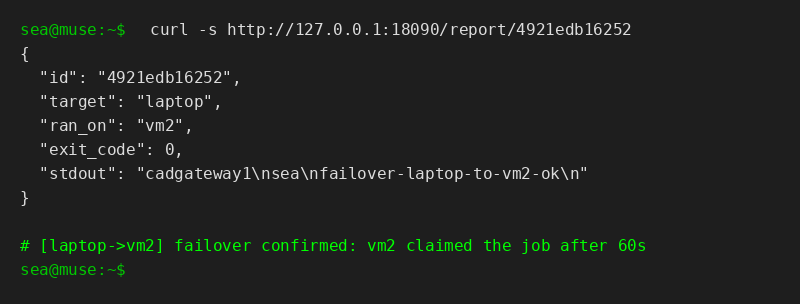
3. Warm standby with explicit failover. The Fedora VM (cadgateway1) mirrors the laptop’s repos and tools. Failover is opt-in per command, never automatic — a command that runs and fails on the laptop does not silently retry on the VM. That distinction matters: automatic retry of a failed command is how you run a destructive operation twice.
Honest Tradeoffs
Tailscale is not free in every sense:
- Control plane dependence. If Tailscale’s coordination servers go down, new connections cannot establish. Existing tunnels keep working, but you cannot add a new device mid-outage.
- Metadata visibility. Tailscale cannot see your traffic payloads (WireGuard encryption), but it sees topology: which devices exist, what they are named, when they connect. Device names like
prod-databaseare a service inventory leak. I keep mine boring. - Every device needs the client. You cannot share a link with someone who does not have Tailscale. For public sharing, pair it with something like Cloudflare Tunnel.
For a private homelab, these are acceptable. For a public service, they are not — and that is fine, because port forwarding still exists for that.
The Bottom Line
Four machines, zero open ports, reachable from anywhere. Total router configuration changed: none. Total DDNS subscriptions: zero. Times I have been woken up by a port scan alert: zero.
The setup took a weekend. The debugging took another weekend. I would do it again.
Running a homelab on Tailscale? The single highest-leverage thing you can do is bind every service to the tailnet IP and verify it with ss -tlnp. Everything else is optimization.
See also: Three Machines, One Shell: Relaying Commands from an AI Agent to WSL via a VPS
See also: SSH Tunnel to VPS: A Reverse Tunnel Blocked by Egress Filtering
FAQ
Is Tailscale better than port forwarding for remote access? For private access, yes. No open ports means no internet-wide scanning. It also works behind CGNAT where port forwarding is impossible.
Does Tailscale work without port forwarding? Yes. Tailscale uses NAT traversal (WireGuard) to establish direct peer-to-peer connections without any router configuration.
Can I use Tailscale to access my home lab from outside? Yes. Install Tailscale on your home machines and your remote device. They join the same private tailnet and can reach each other by IP or MagicDNS hostname.
What happens if Tailscale’s servers go down? Existing connections keep working. New connections cannot be established until the control plane recovers.
💬 Comments