I tried to create a reverse SSH tunnel from a sandboxed virtual machine to a self-managed Oracle Cloud VPS. The VPS was reachable from my own computer, and its SSH service could listen on both its normal port and a second port. The reverse tunnel from the sandbox never came up. The failure was not fixed by changing the VPS firewall: the sandbox’s forced egress proxy would not carry a usable connection to my server.
Quick answer
A reverse SSH tunnel only works if the machine behind the tunnel can open an SSH transport to the VPS. In this test, the Oracle instance and its SSH configuration were made reachable, but the sandbox’s egress proxy rejected or stalled connections to that destination. Diagnose outbound reachability first, then test the VPS from an independent network. Do not keep changing server-side rules when the client network is suppressing the connection. The exact proxy policy was outside my control, so this attempt had no VPS-side fix.
What I Was Trying to Connect
The sandbox VM, which I called Muse, had no public address that I could connect to directly. My plan was to let Muse initiate an outbound SSH connection to a VPS with a public address. SSH’s remote-forward option, -R, would ask the VPS to listen on a loopback port and forward connections over the already-established SSH session back to Muse’s local SSH server.
The intended path was:
- Muse opens an SSH connection to the VPS.
- The SSH session establishes a listener on the VPS at
127.0.0.1:2222. - From my local machine, I SSH to the VPS and make a second SSH connection through that listener to Muse.
Keeping the forwarded listener bound to 127.0.0.1 matters. It means the tunnel endpoint is reachable only from the VPS itself, rather than exposing Muse’s SSH service to the whole internet. A reverse tunnel is not a firewall bypass button: both the forwarding server and client must allow the requested forwarding, and the initiating machine must be able to reach the VPS in the first place.
Had the sandbox been able to reach the VPS, the intended tunnel command would have looked like this. This is the design being tested, not a command that succeeded in this run:
ssh -N -T -i ~/.ssh/vps_tunnel \
  -o ExitOnForwardFailure=yes \
  -o ServerAliveInterval=30 \
  -o ServerAliveCountMax=3 \
  -R 127.0.0.1:2222:127.0.0.1:22 \
  -p 443 ubuntu@VPS_PUBLIC_NAME
After the tunnel is established, a client with authorized access to both accounts could reach Muse through the VPS with a second SSH hop:
ssh -J ubuntu@VPS_PUBLIC_NAME -p 2222 [email protected]The jump host’s loopback address is intentional: the VPS connects to its own 127.0.0.1:2222, where the reverse-forward listener lives. This only works while the first SSH process stays alive and Muse’s SSH service accepts the forwarded connection. Use host-key verification and separate, least-privilege credentials. Do not expose port 2222 publicly or enable GatewayPorts for this loopback-only design.
Provisioning the Oracle Cloud VPS
I created an Ubuntu 26.04 instance in Oracle Cloud Infrastructure’s Toronto region. The first attempt to provision an Ampere VM.Standard.A1.Flex instance failed with an out-of-capacity message. A later retry succeeded. Capacity availability is a cloud-provider condition, not a setting that can be corrected inside the guest. If a shape is unavailable, check the selected availability domain and region, then retry later or choose another supported shape if the workload allows it. Do not assume a particular free-tier capacity or price will be available; confirm current eligibility and billing terms in the provider console.
For this test I created a VCN, a public subnet, an Internet Gateway, and a route table. A public IPv4 address alone does not make an instance reachable. The subnet must have a route toward the Internet Gateway, and applicable security lists or network security groups must permit the traffic. Oracle’s networking documentation describes the public-subnet route and the role of security rules in allowing traffic through the gateway (Oracle Internet Gateway documentation).
My initial SSH connection from home timed out. I checked the packet path in order: public IP assignment, subnet configuration, route table, Internet Gateway, OCI security rules, the guest firewall, and the SSH listener. The issue was in the OCI network path/rule configuration, not in the local SSH key. A timeout usually means no response made it back; it does not by itself identify which hop dropped the packet.
Make the VPS Reachable on SSH Ports
The normal SSH port, TCP 22, worked when I connected from my own computer. The sandbox’s network required a proxy, and that proxy did not permit a direct connection to port 22. I tested whether an SSH listener on TCP 443 would be reachable through the proxy’s HTTP CONNECT mechanism. Port 443 is commonly used for HTTPS, but putting SSH there does not make SSH into HTTPS and does not guarantee that a proxy will allow it.
During setup, I initially configured the OCI ingress rule for port 443 with source 10.0.0.0/16. That range describes private addresses inside my VCN, so it did not authorize clients from outside the VCN. The screenshot records that initial state:
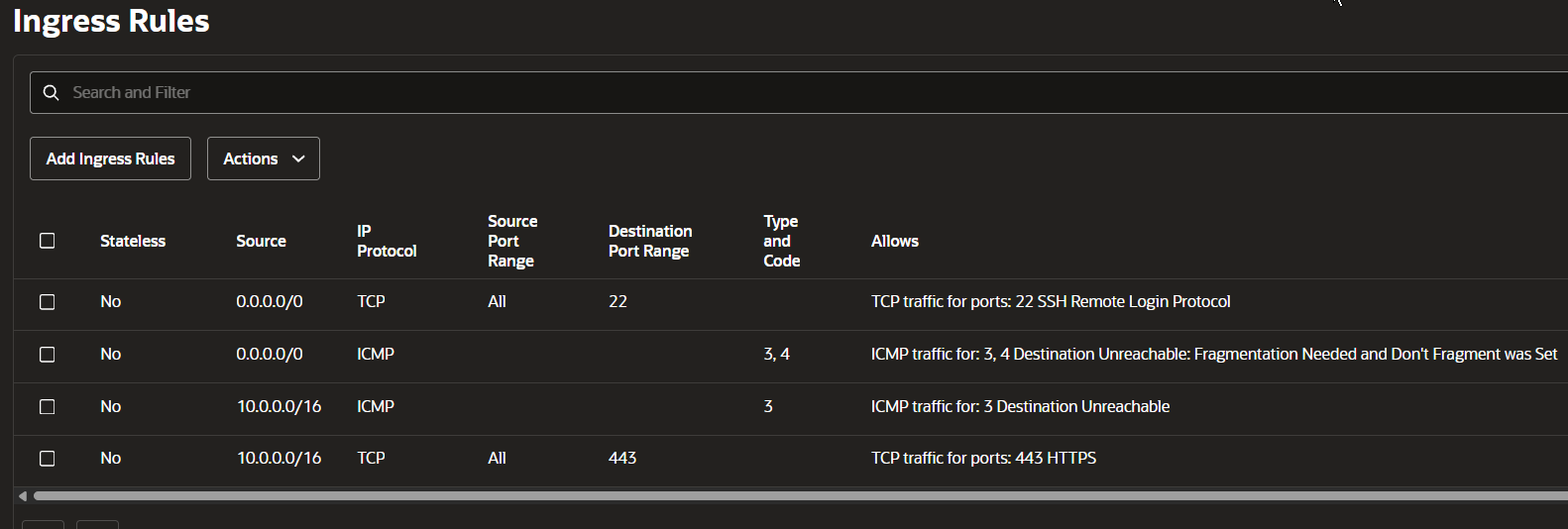
Initial OCI rule: port 443 allowed only from the VCN CIDR. Port 22 was also shown open to all IPv4 sources in this captured state.
Changing the port 443 source to 0.0.0.0/0 made the rule internet-wide. The corrected screenshot shows the test configuration:
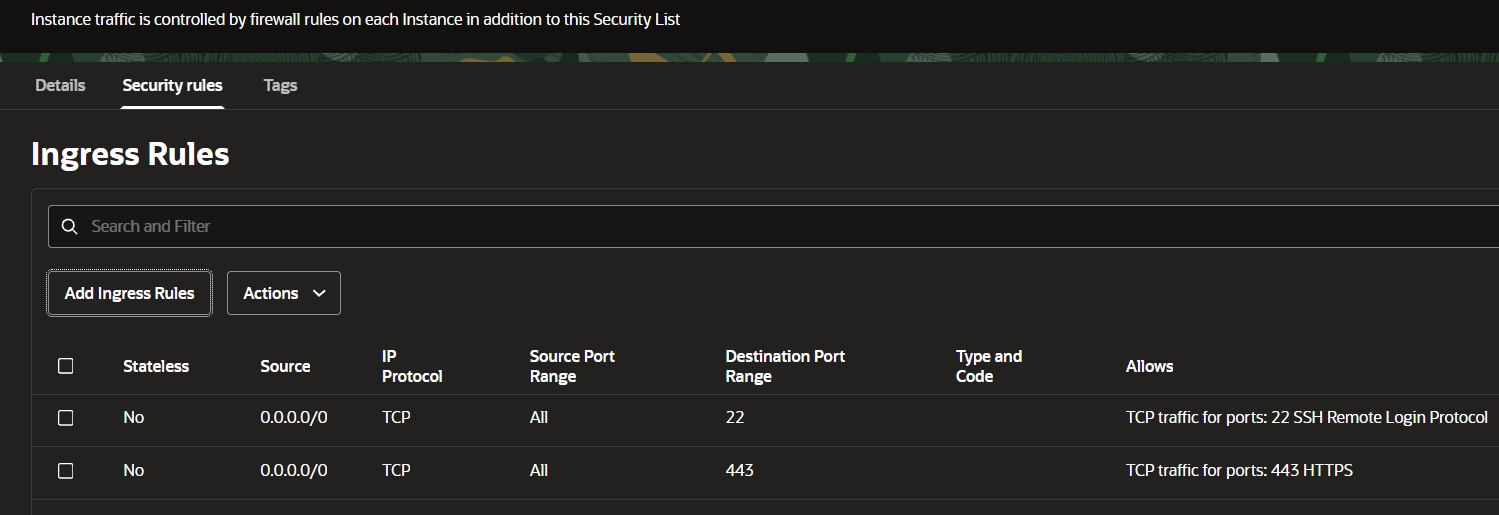
Historical diagnostic configuration, not a recommended final firewall policy. Both SSH ports are open to every IPv4 source here; restrict them to trusted administrator addresses and remove temporary rules after testing.
Oracle recommends limiting SSH ingress to known source ranges (Oracle networking security guidance). In a real deployment, use the narrowest stable administrator IP range, a VPN, or a bastion design. Remove temporary diagnostic rules after testing.
An ingress rule is only one part of the path. The port also needs to be allowed by the instance’s host firewall, and a process or socket unit must be listening on it. I used a dedicated ED25519 key for this test and kept the private key on the client. On Windows, OpenSSH may reject a private key whose ACL allows other accounts to read it; icacls can restrict access to the current user. Never paste a private key, proxy password, or full credential-bearing command into a public article or support log.
Ubuntu SSH Socket Activation Changed the Port Setup
On the VPS, adding Port 443 to /etc/ssh/sshd_config and restarting ssh did not create a listener on 443. The SSH service was using systemd socket activation: ssh.socket owned the listening sockets and started the service for incoming connections. In that arrangement, changing only the daemon’s port setting does not necessarily change the socket that accepts the connection.
I confirmed the listener with ss -tlnp and inspected the service relationship with systemctl status ssh. The relevant diagnostic is whether the service is triggered by a socket unit. When socket activation owns the port, configure the socket unit using a systemd drop-in and verify the effective unit before restarting it. A conceptual drop-in for adding a listener is:
sudo install -d -m 0755 /etc/systemd/system/ssh.socket.d
printf '[Socket]\nListenStream=443\n' | sudo tee /etc/systemd/system/ssh.socket.d/override.conf
sudo systemctl daemon-reload
sudo systemctl restart ssh.socket
sudo ss -tlnp | grep -E ':(22|443)\b'
Do not paste this blindly into a remote session. First inspect the vendor unit and any existing drop-ins. Socket-unit options can replace inherited list-valued settings rather than simply append to them, depending on how the unit is configured. Make sure port 22 remains available before closing the session you are using to administer the VPS. Keep an existing SSH connection open, validate a new connection on the intended port, and only then remove any temporary configuration. The Ubuntu 26.04 release notes document OpenSSH changes for that release (Ubuntu 26.04 release notes); the installed system’s unit files remain the authority for the instance you are troubleshooting.
Test the Proxy Before Blaming the VPS
From Muse, a direct SSH attempt to the VPS on port 22 closed at the sandbox’s proxy address. An HTTP proxy was configured for egress, so I tested a CONNECT-style path with socat as SSH’s ProxyCommand. The example below intentionally uses placeholder values. Do not put real proxy credentials in shell history, tickets, or a published article; use the sandbox’s approved secret mechanism and follow its network rules.
ssh -i ~/.ssh/vps_tunnel \
  -o BatchMode=yes \
  -o 'ProxyCommand=socat - PROXY:PROXY_HOST:%h:%p,proxyport=3128' \
  -p 443 ubuntu@VPS_PUBLIC_NAME
The connection did not produce a usable SSH banner. A banner-exchange timeout means SSH did not receive the protocol greeting in time. It is a symptom, not a diagnosis: the delay can come from a proxy, firewall, route, or a server that accepted TCP but did not deliver SSH data. I separately tested a known-good HTTPS site through the same proxy; that request completed. That control showed that the proxy could forward some HTTPS traffic, but it did not prove that it would forward arbitrary TCP or that it could reach every destination.
One supplied diagnostic screenshot was captured from Windows PowerShell, not from Muse. It shows a first curl command using a Bash-style backslash continuation and a later attempt where Windows could not resolve the proxy hostname:

This image documents a separate Windows-side test. The first command is malformed for PowerShell because \ is not its line-continuation character; the later output says that this Windows environment could not resolve hatch-egress-proxy. It does not establish what Muse could resolve or prove the sandbox’s destination policy. The VPS address is redacted.
I also used verbose curl output while testing HTTPS requests. The certificate issuer shown by curl -v was a sandbox egress CA rather than a public issuer for the destination. That is evidence that HTTPS was being intercepted or re-signed by the proxy on that request. It is not, by itself, proof that every possible TCP stream or SSH-over-CONNECT session was decrypted in the same way. A proxy can apply different handling based on destination, protocol, port, and policy.
In my tests, the proxy returned a CONNECT success for some attempts but then no useful upstream response arrived. A 200 Connection Established response only tells the client that the proxy accepted the CONNECT request at that point. It does not guarantee that the end-to-end SSH handshake will complete. I compared a permitted HTTPS destination with the VPS and another public IP; only the permitted site returned an HTTP response. That pattern was consistent with destination-based egress filtering, but the sandbox’s internal policy was not visible to me, so I could not prove the exact filtering rule from the client side alone.
What the Tests Proved and What They Did Not
The test results separated the healthy parts from the blocked path:
| Test | Result | What it tells you |
|---|---|---|
| My home computer to VPS on TCP 22 | SSH shell opened | The instance was reachable from that network on port 22. |
| VPS to a public DNS address | ICMP replies received | The VPS had outbound connectivity for that test. |
| Muse directly to VPS on TCP 22 | Proxy closed the attempt | Direct outbound TCP was not available on that path. |
| Muse through proxy to VPS on TCP 22 | Proxy refused or did not complete the request | The proxy did not provide a usable SSH path on port 22. |
| Muse through proxy to VPS on TCP 443 | No SSH greeting; request stalled or closed | Changing the destination port did not establish an SSH transport. |
| Muse through proxy to a known HTTPS site | HTTP response returned | Some HTTPS egress worked, not that arbitrary destinations were allowed. |
Those checks establish that the VPS could accept SSH from at least one independent network and that Muse’s route through its proxy behaved differently. They do not establish that the VPS is reachable from every internet provider, nor do they reveal the proxy’s complete allowlist. The practical conclusion is narrower and still decisive: I could not establish the outbound SSH session required for the reverse tunnel from this sandbox.
No change to the VPS’s sshd_config, socket unit, security list, or port number can force a remote proxy to pass traffic it blocks. Further broadening server ingress would increase exposure without fixing a client-side egress restriction. The right next step is to ask the sandbox administrator which destinations and protocols are supported, or use a sanctioned connectivity method. Do not try to evade an organization’s network controls by disguising SSH as HTTPS.
A Safer Diagnostic Order
For a similar problem, I now check the dependency from the constrained client first:
- Confirm the VPS hostname or address and the target port from an approved client network.
- From that same network, verify that the VPS SSH service responds and that the host key is expected.
- From the constrained client, inspect proxy variables and the documented proxy behavior. Avoid printing credentials from environment variables.
- Test one allowed destination and the intended destination with the same tool, proxy, and port. Record the exact return code and elapsed time.
- If CONNECT is accepted, continue checking for the SSH greeting; do not treat the proxy’s 200 response as success for the tunnel.
- Compare DNS resolution, destination, port, protocol, and certificate issuer separately. Change one variable at a time.
- Only after the client can reach the endpoint should you spend time changing server firewall or SSH settings.
For a reverse forward, keep the remote bind address on loopback unless there is a deliberate, reviewed reason to expose it. Enable only the forwarding features you need, use a dedicated unprivileged account and key, and consider restricting that key with server-side authorized_keys options. Monitor the tunnel and have a clear revocation plan. A long-running tunnel is an access path into the private machine, so treat its key and VPS account as production credentials.
Alternatives and Takeaways
The next direction I considered was a managed private overlay network, such as Tailscale, because its coordination endpoints were reachable in my preliminary test. That was only a lead, not proof that the sandbox would permit the required client traffic. Before adopting it, I would check the sandbox’s network policy, the provider’s supported deployment model, and whether device enrollment is allowed. Do not install a new networking agent or route into a managed environment without authorization. A provider-approved bastion, remote access gateway, or support channel may be the correct answer instead.
The VPS itself remained useful; it simply was not a bridge the sandbox could reach. The main lesson was to test the network dependency before tuning the remote server. The port-22 listener, the extra socket listener, and the OCI rules all mattered for ordinary VPS access, but they could not remove the sandbox’s outbound restriction. Proxy diagnostics helped narrow the behavior, while careful wording kept the conclusion bounded to what the tests actually showed.
💬 Comments