This site runs on a pipeline I can describe in one sentence: I write in WSL, preview locally with Hugo, push to GitHub, and Cloudflare Pages puts it on the internet. The whole thing takes under two minutes from git push to live. Here is how it is wired up, what breaks, and what I learned setting it up.
The Pipeline in 30 Seconds
WSL (write + preview) → git push origin main → Cloudflare Pages (build) → pwshtips.com
Four stages, no servers to maintain, no FTP, no manual deploys. Each stage does exactly one job. I did not design this upfront, by the way — it accreted over two years of things breaking at the worst possible time.
Stage 1: Write and Preview in WSL
Everything lives in /home/sea/project/pwshtips/pwshtips.com on my laptop’s WSL (Ubuntu). New posts go in content/posts/, images in static/img/. I edit with whatever editor is open — usually VS Code remote into WSL, sometimes plain vim when I am too lazy to wait for VS Code to start. The files are just Markdown and PNGs; there is nothing fancy to be precious about.
Before anything goes public, I preview it locally:
hugo --environment development
or run the dev server:
hugo server
and open http://localhost:1313/. What you see there is very close to what the public will see — same theme, same content. The one difference: the development build skips production minification, so page weight is slightly higher locally. That is fine for previewing.
One gotcha I hit: clicking a post on the local server sometimes jumped to pwshtips.com instead of staying on localhost. That happens when the site’s baseURL is set to the production domain and Hugo renders absolute URLs. The fix is rebuilding the local public/ with the development environment:
rm -rf public
hugo --environment development
If the local server ever crashes or serves a blank page, the first thing I check is the watcher service log:
journalctl -u hugo-watcher.service -n 20 --no-pager
Stage 2: Git — dev6 for Work, main for Deploy
I do all writing on a dev6 branch. When a post is ready, the sequence is:
git add .
git commit -m "descriptive message"
git switch main
git merge dev6
git push origin main
git switch dev6
main is the deploy branch. Cloudflare Pages watches it — every push to main triggers a build. Nothing else triggers a deploy, so I can commit half-finished work to dev6 all day without anything going live.
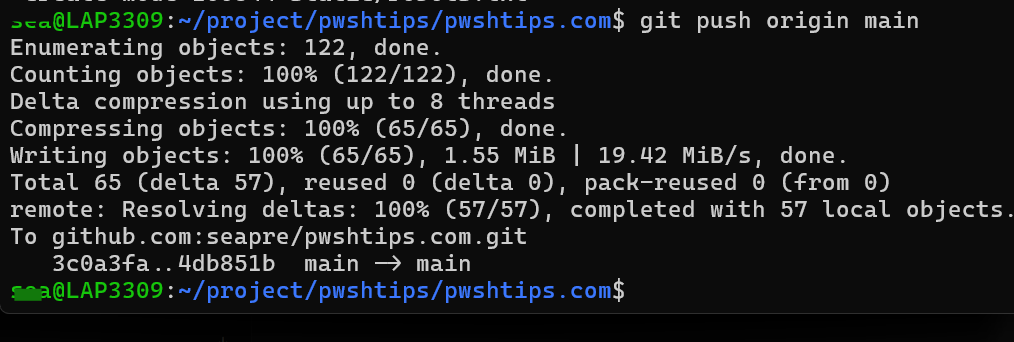
This is a deliberate separation: dev6 is my desk, main is the printing press.
Why the Branch Is Numbered
dev6 is not a permanent branch name — it is a disposable number. It could be dev8, dev9, whatever is next. The number increments every time a work branch goes bad.
I have been burned enough times to make this a habit: you are redesigning the layout, adding a menu, restructuring the theme — halfway through, the site looks broken and you cannot remember which change did it. With a numbered branch, you just abandon it and cut a fresh one from main:
git switch main
git switch -c dev7
The broken experiment stays in dev6 where it cannot hurt anyone. No git reset --hard, no 2 AM git archaeology through the reflog, no staring at the ceiling wondering which commit broke the sidebar. I have used this escape hatch more times than I care to admit, and it has never failed me.
Stage 3: Cloudflare Pages Builds It
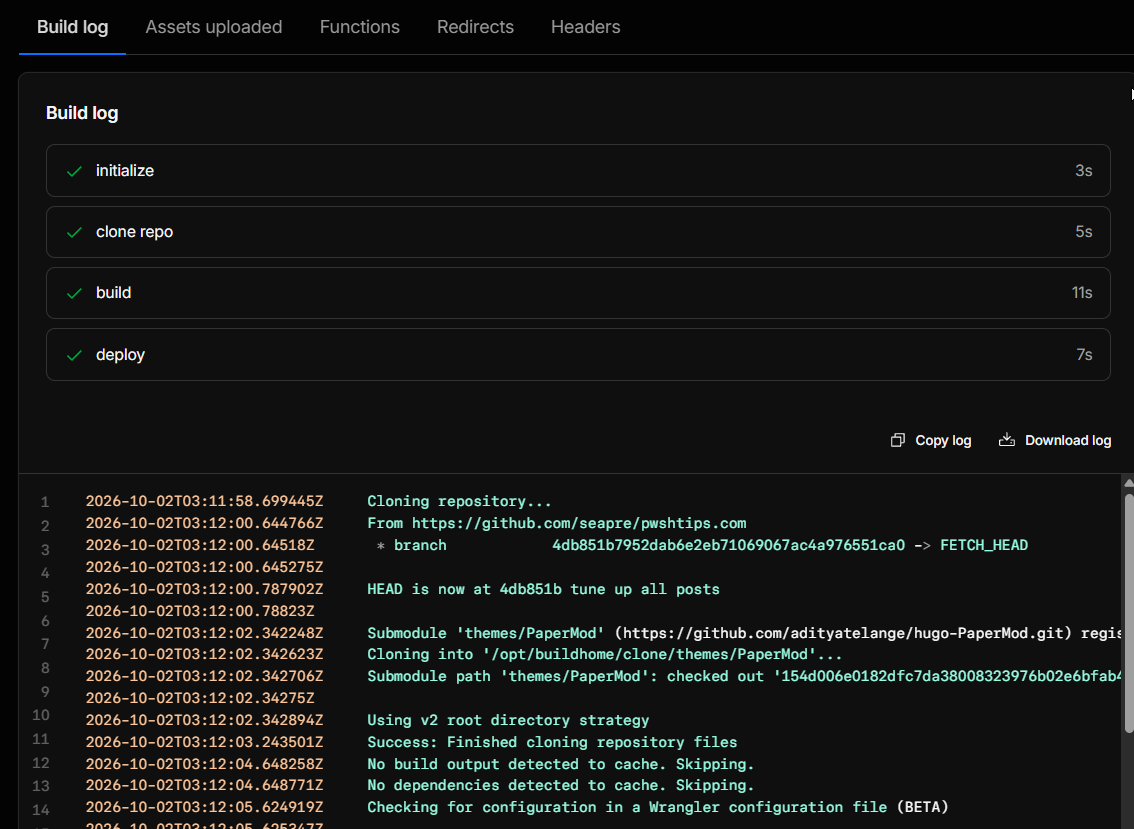
There is no GitHub Actions workflow in this repo. Cloudflare Pages connects directly to the GitHub repository and watches for pushes. On every push to main, it:
- Clones the repo (including the PaperMod theme submodule)
- Runs the build command:
./build-cloudflare.sh - Publishes the
public/directory
The build script is short and does one important thing:
#!/usr/bin/env sh
set -eu
# Hugo does not remove pages that have disappeared from the content tree.
# Clear only the ignored deployment artifact before generating the Pages output.
rm -rf ./public
hugo --environment production --minify --gc
The rm -rf ./public matters. Hugo does not delete output files for content you removed — if you delete or rename a post, the old HTML stays in public/ forever unless you clear it first. I learned this the way everyone learns it: a deleted post kept showing up on the live site.
The flags: --environment production enables production-only config, --minify compresses HTML/CSS/JS, and --gc cleans up unused cache files. The result is a fully static site — no server-side code, no database, just files.
Builds usually finish in under a minute. Cloudflare then pushes the output to its global CDN, and the post is live at pwshtips.com.
Stage 4: Live in Under Two Minutes
From the moment I run git push origin main, the timeline looks like this:
- ~10 seconds: Cloudflare detects the push and starts cloning
- ~30–60 seconds: Hugo builds the site
- ~10 seconds: Deploy to CDN
Total: under two minutes, usually closer to one. I have pushed a post, walked to the kitchen, and opened it on my phone before the coffee finished brewing. The first time that happened I kept refreshing because I did not believe it.
What Breaks (and How I Fixed It)
Submodule failures. The PaperMod theme is a Git submodule. Once, Cloudflare’s build failed with:
fatal: remote error: upload-pack: not our ref cd50cd1e49d6ed3f35be426c7c7f3650a6203f81
Failed: error occurred while updating repository submodules
The pinned submodule commit did not exist upstream anymore. I stared at that error for a good ten minutes convinced Cloudflare was broken before it dawned on me the problem was on my side. The fix:
git submodule sync && git submodule update --remote
git add themes/PaperMod && git commit -m "Fix: Update PaperMod submodule to a valid commit"
git push origin main
ads.txt disappearing. Every rebuild wiped ads.txt, and if Google’s crawler hit the site mid-deploy, AdSense reported “ads.txt not found.” The fix was a Cloudflare Worker that serves ads.txt independently of the Pages deployment — it survives every rebuild because it is not part of the static output.
Blank pages locally. Covered above — check the watcher service logs, rebuild public/ with the development environment.
Why This Setup
I did not choose this stack for ideological reasons. I chose it because each piece removes a chore:
- WSL means I write on the same machine I use for everything else, with real Linux tools.
- Hugo means no database, no PHP, no runtime to patch. Markdown in, HTML out.
- GitHub means version history for every post, and a free remote backup of the entire site.
- Cloudflare Pages means I never think about servers, TLS certificates, or CDN configuration. Push and it is live.
The whole thing has exactly one moving part I maintain: the content. Everything else is someone else’s infrastructure. That is not laziness — okay, it is a little bit laziness — but mostly it is knowing where my time is better spent.
The publishing notes this post is based on live in the repo’s README — including the troubleshooting log. If you run a Hugo site on Cloudflare Pages, steal the rm -rf ./public line. You will need it.
See also: Install and Configure WSL: From Zero to Productive
💬 Comments