I wanted to reach the Linux environment used by my MUSE AI from a laptop away from home. The first design used an Oracle Cloud VPS and Tailscale as the network path. During testing, a listener appeared to be active on the VPS, but clients received TCP resets and the Muse environment did not get a usable terminal session. The useful finding was mundane: the Python listener was no longer running when the later connection tests happened.
The investigation also exposed a more important design issue. The attempted bridge connected a raw network socket to an interactive root shell and relied on an outbound proxy plus a retrying service. That is not equivalent to authenticated SSH. This article records the troubleshooting evidence and the secure alternatives, but intentionally does not provide instructions for deploying an unauthenticated persistent shell bridge or routing around a managed egress policy.
Quick answer
Treat the VPS console, public SSH, Tailscale connectivity, firewall, listening socket, and application process as separate layers. A TCP reset usually means a host or firewall actively rejected the connection; it can be consistent with no process listening, but does not prove that by itself. In this test, the listener had been observed earlier, then later packet captures showed SYNs answered with resets; restarting the authorized listener restored the expected connection. For remote administration, prefer provider-supported shell access or Tailscale SSH/ordinary SSH with explicit identity, least privilege, and narrow access rules. If the managed Muse environment does not support inbound SSH or an approved agent, there is no safe client-side trick that should override that boundary.
The Access Goal and the Security Boundary
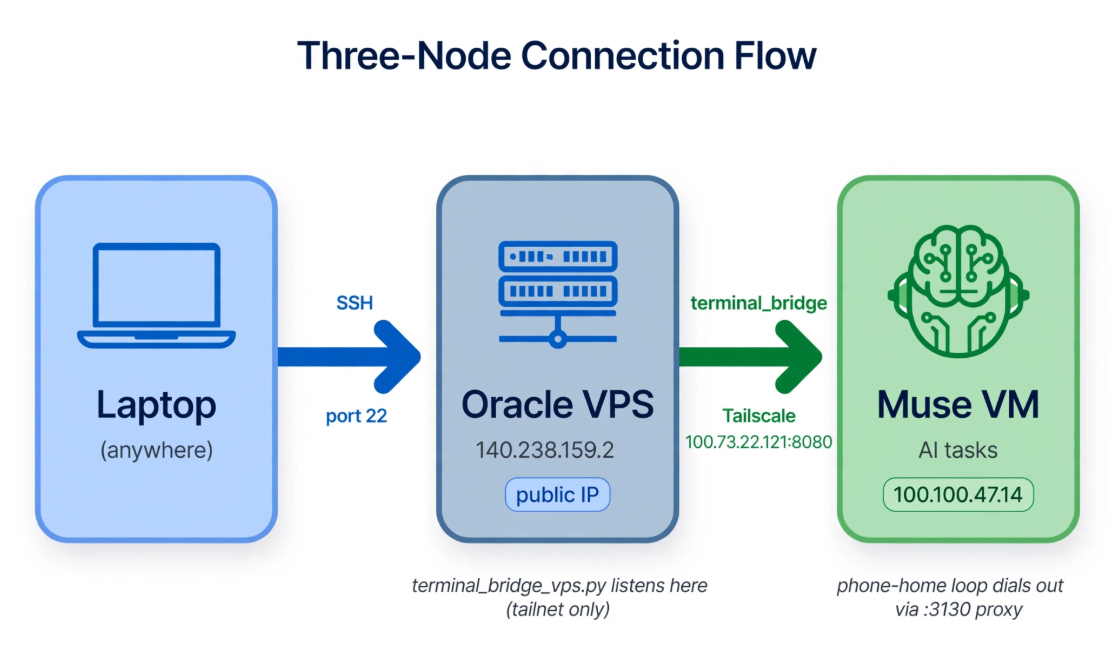
Historical topology from this test. The public VPS address is masked; the tailnet addresses remain as supplied. The custom bridge shown here is not the authenticated access design recommended in this article.
The path was: Laptop (anywhere) - SSH/TCP 22 -> Oracle VPS (public IP masked). The VPS-side terminal_bridge_vps.py listened only on its Tailscale address (100.73.22.121:8080); Muse’s phone-home loop initiated an outbound connection through the managed :3130 proxy to the Muse VM (100.100.47.14).
Important: the phone-home bridge connected a raw TCP stream to a root shell. Restricting its listener to the tailnet did not add application-level authentication. This diagram documents the historical test topology, not a recommended deployment; this post intentionally omits the bridge and persistence implementation.
The goal was to open a terminal on a private Linux VM from a device on the internet without exposing the Muse VM directly. The working notes describe an Oracle VPS on a Tailscale network, a managed network client in Muse, and an attempted TCP bridge. The intended network path used outbound connectivity from Muse to the VPS, with the operator first reaching the VPS over SSH.
There are two different questions hidden in that design:
- Can the operator securely authenticate to the VPS or private network?
- Is there an approved, authenticated way for that operator to run commands on Muse?
Solving the first does not automatically solve the second. Tailscale membership or an SSH login to the VPS does not make every process listening on the VPS safe. The target shell still needs authentication and authorization of its own, and the managed VM provider’s policy still applies.
The initial bridge design crossed that boundary: a TCP connection was attached to an interactive /bin/bash, and the process on the Muse side ran with root privileges. The custom listener did not implement SSH authentication, user identity, or per-command authorization. Binding a listener to a Tailscale address reduces public exposure, but it is not a replacement for application authentication; every device allowed to reach that tailnet port may be able to interact with it. A retry loop or service that recreates access after a reboot also creates persistence. Those properties make the design too risky to recommend as a general terminal-access recipe.
If you administer both systems, use the narrowest supported access path and keep root login out of the design. If the platform deliberately provides only an outbound managed client and no supported shell service, ask the platform owner for an approved remote-execution method rather than tunneling an unrestricted root shell through its proxy.
Phase 1: Separate the Oracle Console from the Running VPS
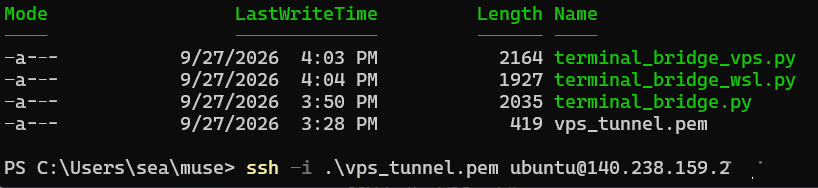
Make sure vps_tunnel.pem is in the current folder, then connect to the VPS from PowerShell. Replace YOUR_VPS_PUBLIC_IP with the address shown in your OCI instance details:
ssh -i .\vps_tunnel.pem ubuntu@YOUR_VPS_PUBLIC_IPThe PEM file is the private key: keep it on your computer, restrict its file permissions, and never upload it or share its contents. The public IP is masked in the screenshot.
The first apparent problem was a failed login to the Oracle identity or web-console portal. It was tempting to conclude that the VPS was unavailable, but these are different systems. The browser console is the cloud control plane; an already-created instance and its network service are the data plane. A console authentication problem does not, on its own, show that the guest OS has stopped.
From an authorized workstation, I tested ordinary SSH to the VPS using its private key. The SSH session succeeded, confirming that the instance and its public SSH path were working at that time. The practical lesson is to test each path independently:
| Check | What a success establishes | What it does not establish |
|---|---|---|
| Sign in to the cloud console | The account can use the web control plane | That every guest service is healthy |
| SSH to the VPS public address | This client can reach the VPS SSH service | That Muse can reach the VPS from its managed network |
| Tailscale status or ping | A device is present or reachable through the tailnet | That a particular TCP application port is listening |
| TCP connection to the bridge port | A TCP handshake completed at that moment | That an interactive shell is authenticated or safe |
Keep the actual public address, account name, key filename, and tailnet addresses out of public troubleshooting posts. They are unnecessary for explaining the test and can disclose infrastructure details.
Phase 2: Understand What Tailscale Does Here
Tailscale provides an authenticated private network between devices that have joined the same tailnet, with access governed by the tailnet policy. That is different from a generic HTTP proxy. A client configured to send a request through an HTTP proxy is asking that proxy to make or relay a TCP connection; it is not, by that fact alone, sending a WireGuard packet through Tailscale. The exact routing depends on the platform’s managed networking and should not be generalized from one sandbox.
Install and authenticate Tailscale on the VPS
On the Ubuntu VPS, I installed the Linux client using Tailscale’s official installation command, then started the connection flow:
curl -fsSL https://tailscale.com/install.sh | sh
sudo tailscale up
The tailscale up command prints a device-authorization URL. Open that URL privately and sign in to the intended tailnet. Do not paste the one-time device URL into a public post, screenshot, or support ticket; it can authorize the device while the request is still valid. The URL from this run is intentionally omitted. Tailscale documents this Linux installation flow in its official install guide.
After authentication, I recorded these VPS details:
| Property | Value observed in this run |
|---|---|
| Tailscale IPv4 | 100.73.22.121 |
| Tailscale client version | 1.102.4 |
| Kernel | Linux 7.0.0-1009-oracle |
| State | Connected |
To check the current device rather than rely on old notes, run tailscale status, tailscale ip -4, tailscale version, and uname -r on the VPS. A Tailscale IP identifies a node inside the tailnet; it is not the VPS’s public address. Keep tailnet access policy narrow even though the address is not publicly routable.
Tailscale SSH is an option only when the destination is a supported device running Tailscale with its SSH server feature enabled and the tailnet policy permits the connection. Tailscale’s documentation describes the host requirements and the separate network-access and SSH-access rules (Tailscale SSH documentation). A device merely reachable behind a subnet router is not automatically a Tailscale SSH server. If Muse uses a provider-managed client that exposes no SSH server or device controls, you cannot enable Tailscale SSH from the VPS.
Before trying a new route, verify the supported features with the owner of the managed environment. Do not assume that a successful connection from the provider’s proxy to one port means arbitrary TCP relaying is permitted. Do not disguise SSH as HTTPS or use a proxy in a way that evades the published network policy.
Phase 3: The Listener Was Gone by the Time I Tested
The VPS-side Python process had printed that it was listening on the tailnet interface and port 8080. At a later point, a Windows Test-NetConnection check reported TcpTestSucceeded: False. A packet capture on the VPS showed incoming SYN packets followed immediately by RST packets from the VPS address. A local connection test had succeeded earlier. Restarting the listener was followed by a successful connection from Muse.

Historical VPS-side status capture. The listener was waiting for Muse over the tailnet. If an approved connection remains waiting, ask Muse or its platform operator to check the client-side service and permitted outbound route; do not open the bridge to the public internet.
When the prompt root@htch-runtime:/# appeared, the bridge had reached a root shell in Muse. I checked the working directory with pwd, listed the filesystem with ls, and checked memory with free -h (the capture also shows uname -a). These are read-only checks, but the root@ prompt confirms that this design granted privileged shell access. That is a significant security risk, not a recommended access pattern.
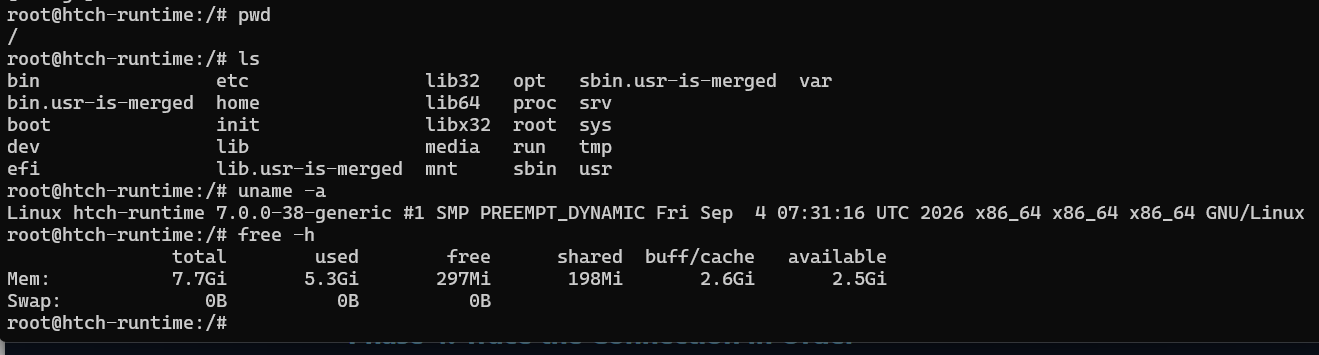
Successful connection evidence from the test. It documents the outcome only; the bridge implementation remains intentionally omitted.
Taken together, those observations support the conclusion that the process was no longer accepting connections when the failing probes ran. The notes do not establish whether the process crashed, was terminated when its interactive SSH session ended, or was stopped for another reason. The earlier ss result is only a snapshot; it cannot prove that the listener remained alive minutes later.
A TCP reset is not a unique signature for a dead process. The kernel commonly sends a reset when no socket is listening, but a firewall rule can also actively reject traffic with a TCP reset. The timing matters: collect listener state, process state, firewall counters, and packet captures during the same test window. A dropped SYN with no response suggests a different class of problem from a fast reset.
Phase 4: Trace the Connection in Order
When a private-network connection fails, work from the client toward the service. Capture timestamps and results for one attempt so that you are not comparing a listener check from one moment with a packet trace from another.
1. Confirm the service process and listener together
On a Linux VPS you administer, check the process and listening socket close together:
date -Is
pgrep -a -f 'terminal_bridge|python3' || true
sudo ss -ltnp
ss shows the current socket table; pgrep gives a quick process snapshot. Use the actual service name if the application is managed by systemd. A process that was listening earlier may have exited, and a process name alone does not prove that it owns the expected address and port. Check that the bind address is the intended private interface, not a wildcard public bind.
2. Check the network path and policy
Confirm that both devices are authorized members of the intended tailnet and that the relevant access policy permits the source to reach the destination port. For a managed client without shell access, use the platform’s supported status view or request its network logs; do not install an alternate tunnel to sidestep the control.
On a Linux host you control, inspect the host firewall as well as any cloud security list or network security group. A successful ping is not a test of a TCP listener. Likewise, an allow rule in OCI does not override a deny rule in the guest firewall, and a tailnet policy does not start an application process that has exited.
Tailscale recommends explicit access policies for network and SSH access. Its policy syntax documentation describes grants, ACLs, and SSH rules. For interactive administration, grant only the intended users or groups access to the selected device and operating-system accounts. Avoid broad rules that allow every tailnet member to become root.
3. Capture packets at the destination
If you are authorized to inspect the VPS, a brief capture can establish whether the SYN arrives and how the host responds:
sudo tcpdump -ni tailscale0 'tcp port 8080'Use the interface actually carrying the traffic; interface names differ by host and configuration. Stop the capture after the test, and avoid publishing captures that contain unrelated addresses or payload data. A SYN followed by a reset means the destination actively refused that connection, but you still need the contemporaneous listener and firewall state to distinguish an absent process from an explicit reject rule. Repeated SYNs without a response more often point to packet drops, routing, or a filtering device.
4. Test the application after TCP
Once a TCP handshake succeeds, test the protocol expected on that port. For SSH, the server should present an SSH identification banner, and a normal SSH client should then perform host-key verification and user authentication. A raw TCP accept is not proof that the service is SSH, and an open socket that forwards bytes to a shell is not a substitute for that authentication exchange.
In the original test, a proxy path to the VPS’s SSH port returned an OpenSSH banner, while the custom port did not. That was useful comparative evidence, but it did not establish a universal rule about the proxy or prove that Tailscale always traverses it. Tests should be repeated from the same source, through the same approved route, with both target ports checked at the same time.
Use an Authenticated Access Method
If the remote Linux device supports Tailscale itself, use Tailscale SSH or a standard SSH server over the private tailnet. Enable the server only on the destination, review the tailnet policy, and allow a named user or narrowly scoped group to connect as a non-root OS user. Use reauthentication or check mode for sensitive hosts where appropriate. The current Tailscale SSH guide explains setup, supported devices, and policy requirements.
If both endpoints support ordinary OpenSSH but inbound access to the remote device is impossible, an SSH remote forward can be a legitimate option when the platform explicitly permits it. Unlike a raw shell socket, SSH authenticates the server and user and encrypts the session. Keep any remote listener bound to loopback, use a dedicated non-root account and key, restrict forwarding in server policy, and protect the VPS with an explicit access list. This is not permission to bypass a managed egress proxy; obtain approval first and use the platform’s documented route.
If the provider does not permit an SSH server, remote forward, or user-managed Tailscale node on Muse, use the provider’s interactive terminal or remote-command feature. Ask for an approved access workflow if the built-in feature is insufficient. A hard platform boundary is not a broken port that should be worked around with an unauthenticated listener.
Keep the Service Observable and Recoverable
The failure also showed why a foreground process tied to an SSH session is a fragile way to keep a service available. For an ordinary authenticated service on a host you own, use the operating system’s supported service manager, run as a dedicated unprivileged account, capture logs, and configure deliberate restart limits. Verify that the host’s storage and service configuration survive reboot before relying on them. Managed or ephemeral VMs can reset system directories or recreate the image; confirm persistence guarantees with the platform owner.
Monitor the process rather than trusting an old LISTEN line. A small health check can verify service state, and logs can reveal exit status and restart history. Be careful with automatic restart loops: they can hide a repeated crash, create noisy traffic, or unexpectedly re-establish remote access. For administrative access, document who can start and stop the service, how to revoke keys or tailnet permissions, and how to remove the listener completely.
Lessons from the Debugging Session
The important result was not that one unusual bridge can be made to work. It was that the failure became clear after separating the layers: the cloud console login was unrelated to public SSH; public SSH to the VPS did not prove Muse’s path; a listening socket observed earlier did not prove the process was alive during a later test; and an RST did not identify its cause without checking the firewall and process state at the same time.
For an AI workstation or managed coding environment, privilege boundaries matter as much as connectivity. A direct root shell over a custom socket has no reliable user authentication, auditing, or command-level controls. Use the platform’s supported terminal, Tailscale SSH on a properly enrolled host, or ordinary SSH under a limited user with reviewed forwarding rules. If none is supported, stop and request an approved method rather than turning a connectivity problem into a persistent root-access path.
Further Reading
- Create an Oracle Free VPS — account, network, Compute instance, and SSH setup.
- SSH Tunnel to VPS — earlier testing of Oracle networking and proxy reachability.
- Tailscale SSH — prerequisites and SSH access control.
- Tailscale policy syntax — current network and SSH policy format.
💬 Comments