My laptop goes to sleep, and my work shouldn’t have to stop. That’s the whole idea behind the standby VM sitting in my home lab: when the laptop is off or suspended, queued jobs fail over to the second machine after 60 seconds, run exactly once, and report back who actually ran them.
Simple on paper. The implementation took one day and produced two outages, a phantom debugging session, and a deploy procedure I now trust more than the code it ships.
The setup
Three machines on a Tailscale tailnet, one small Python relay on an Oracle VPS:
- laptop (Windows 11 + WSL2) — the primary dev machine, runs a poller that picks up queued commands every 15 seconds
- vm2 (Fedora 44) — the standby, same poller, different machine name
- vnic1 (Oracle VPS, Ubuntu 26.04) — the relay, a ~9KB Python HTTP server binding only the Tailscale IP on port 8090
The relay holds per-machine queues. A job queued with target=laptop, failover=true is offered to the laptop first. If nobody claims it within FAILOVER_AFTER=60 seconds, any machine may claim it. Reports record both target and ran_on, so minbox -l shows entries like [laptop->vm2].
The claim path is the critical section. Twenty threads hammering /queue/pending simultaneously must hand out each job exactly once — I verified this with a local 20-thread race test before ever touching the live server. A threading.Lock guards claims, inserts, reports, and store writes. CLAIM_TIMEOUT is 660 seconds, deliberately longer than the maximum 600-second command timeout, so a long-running job can’t be re-claimed mid-execution.
That was the design. Then I deployed it.
Outage one: the zero-byte deploy
The new relay went up to the VPS through a temporary file host (catbox.moe). The deploy script downloaded it, verified it, and swapped it into place:
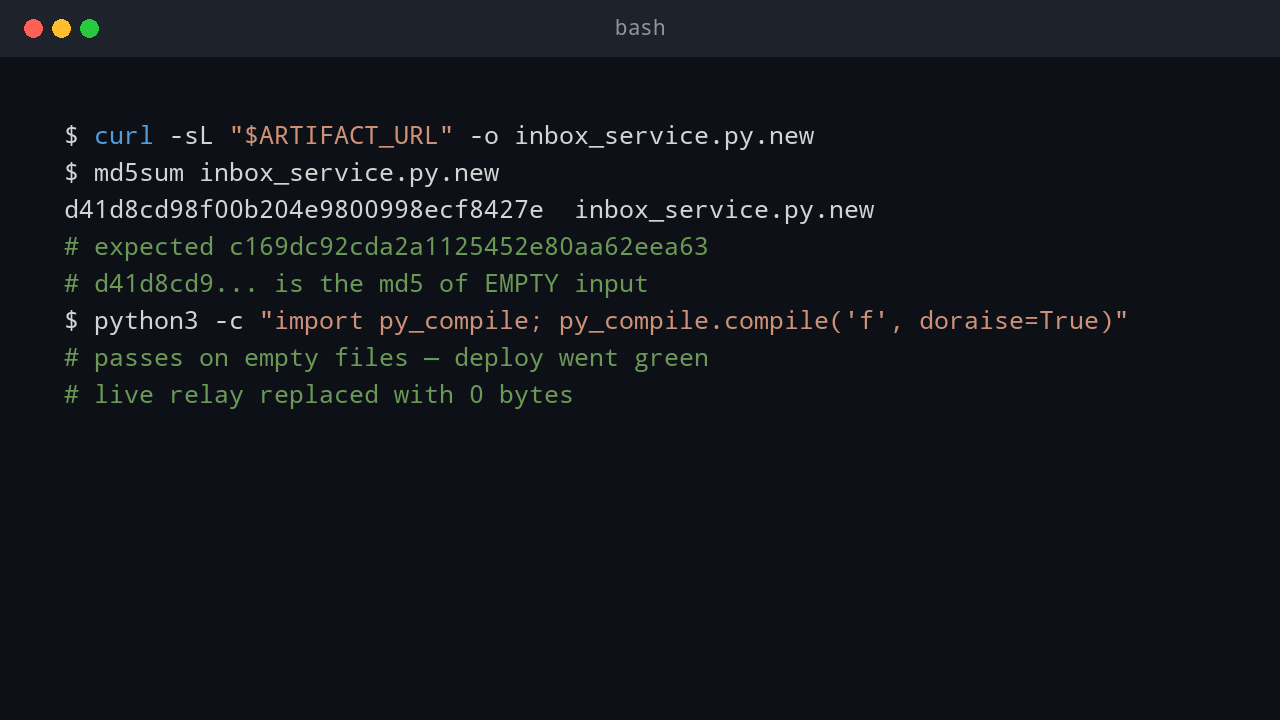
curl -sL "$ARTIFACT_URL" -o inbox_service.py.new
python3 -c "import py_compile; py_compile.compile('inbox_service.py.new', doraise=True)" \
  && mv inbox_service.py.new inbox_service.py
Every step reported success. The relay restarted, printed its listening line, and died.
The downloaded file was zero bytes. Catbox returned a URL and served nothing. py_compile passes on empty files — an empty Python module is syntactically valid. ast.parse("") succeeds too. So the && chain went green, the live relay was replaced with 0 bytes, and the process exited on startup with nothing to execute.
The md5 told the story instantly:
Expected: c169dc92cda2a1125452e80aa62eea63
Actual:   d41d8cd98f00b204e9800998ecf8427e   (md5 of empty input)
I knew d41d8cd98f00b204e9800998ecf8427e by heart after that morning. It’s the md5 of nothing, and it had replaced my relay.
But the dead relay wasn’t the worst part. The worst part was what happened on every restart attempt after that.
The zombie job loop
The deploy itself had been delivered as a queued job through the relay — job 31be1e1fd5dd. The deploy script’s final step killed the relay (pkill) and started the new one. But the poller that executed the deploy never got to POST its completion report, because the relay it was reporting to was already dead.
So the job stayed in the queue. On every manual relay restart, within about three seconds, the laptop poller re-claimed the dead deploy job and re-executed it: re-downloaded the (still broken) artifact, re-truncated the just-restored relay file, killed the relay again.
I restored the known-good backup. Three seconds later the relay was dead. Restored again. Dead again. The log showed a clean startup line and nothing else — no traceback, no error. It looked like the relay was crashing on its own.
The three-second pattern was the giveaway. Nothing crashes that consistently without a trigger. I stopped the relay, opened ~/.inbox_store.json, and there it was: 31be1e1fd5dd, still sitting in the queue, claimed_at timestamp fresh from the last restart. Deleted the job id from the store while the relay was down, restored the backup (md5 7904708f5fb71af2be010c446f3d9aec verified byte-for-byte), started clean. The relay stayed up.
A deploy that stops the relay must never depend on the relay to deliver its own completion report. That pattern has now bitten twice, and I don’t expect to forget it a third time.
Outage two: the pkill that landed mid-restart
With the zombie deleted and the backup running, I re-did the deploy with a hardened procedure:
- Local smoke test first — the 20-thread claim race, plus a 60-second failover timing check (job stays hidden from vm2 before 60s, claimable after).
- Ship the file through the inbox channel itself in gzip+base64 chunks (catbox had proven flaky), reassemble on the VPS.
- Verify size > 0 AND exact md5 before the
mv. Abort otherwise. - Syntax check only after the md5 gate.
- Health check after restart, or automatic rollback to the backup.
The deploy job went out. My client waited 180 seconds and timed out. Health checks returned empty. The relay was down again — or so it looked.
It wasn’t down. The laptop poller had been slow to pick up the job (a network stall, the same kind I’d seen before), so the deploy ran after my client gave up waiting. Its pkill killed the old relay right in the middle of my health checks, and the new relay was still starting. By the time anyone looked again, /health was serving failover_after: 60 and the queue was draining normally.
I’d misdiagnosed it as a second crash. The evidence — a clean log, no traceback, health recovering on its own — pointed at a kill, not a crash. The deploy had worked; my monitoring had just been standing in the wrong place at the wrong time.
Building the standby: PowerShell 7 on Fedora
With the failover relay live, vm2 needed to actually match the dev environment. Fedora 44, user sea, no passwordless sudo — so everything went into user space:
mkdir -p ~/pwsh ~/bin
curl -sL https://github.com/PowerShell/PowerShell/releases/download/v7.6.6/powershell-7.6.6-linux-x64.tar.gz \
  | tar -xz -C ~/pwsh
ln -sf ~/pwsh/pwsh ~/bin/pwsh
curl -sL https://github.com/gohugoio/hugo/releases/download/v0.167.0/hugo_extended_0.167.0_linux-amd64.tar.gz \
  | tar -xz -C ~/bin hugo
PowerShell 7.6.6, Hugo 0.167.0 extended, Go 1.24.1 (already present). The poller’s autostart wrapper needed ~/bin on PATH so queued commands could find them:
export PATH="$HOME/bin:/usr/local/go/bin:$PATH"
One wrinkle worth noting for anyone doing this: the wrapper script execs into the poller, so editing the wrapper file is safe for the running instance — bash has already moved on. Editing a script that a running bash is still reading is a different story; bash reads by byte offset, and I once killed a deploy client that way. Short-lived wrappers are fine. Long-running scripts are not.
Then the repos, straight over the LAN with rsync (the Tailscale IP failed host-key verification; the LAN IP was already in known_hosts):
rsync -avz /home/sea/project/pwshtips/ [email protected]:/home/sea/project/pwshtips/
rsync -avz /mnt/c/Seapre/OneDrive/project/go/seapre/app/ [email protected]:/home/sea/project/app/
157MB and 172MB, non-deleting for the initial sync. Verified on the other end: git -C ~/project/pwshtips/pwshtips.com log --oneline -1 → fde4bf9, working tree clean, pwsh --version → PowerShell 7.6.6.
The gray dot: when tailscale up doesn’t
Before any of that could work, vm2 had to join the tailnet. Fresh Fedora install, tailscale up, then check the admin panel — and the machine sat there with a gray dot. Not connected. I killed the command, ran tailscale up again. Still gray. Several rounds of Ctrl+C and retry before it finally went green.
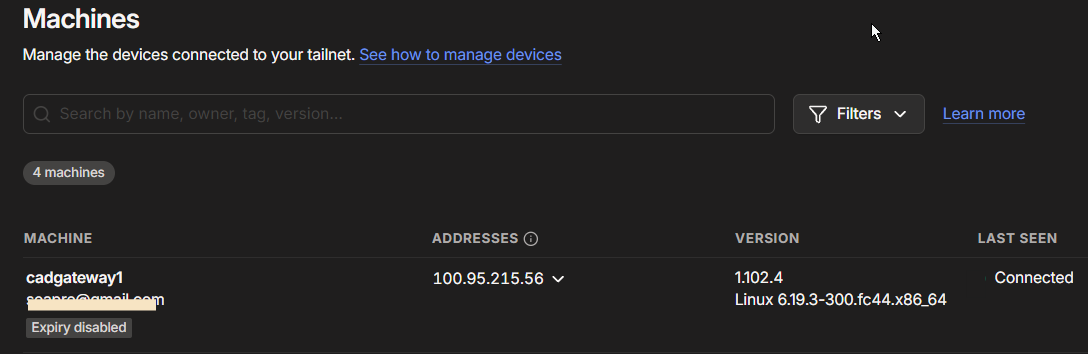
A gray dot in the admin console means something specific: the control plane knows the node exists (it’s registered, it has an IP), but there’s no active control connection. The machine isn’t talking to Tailscale’s servers right now. Green means the control channel is live.
So why would a fresh tailscale up register the node but not connect it? A few things are going on under that one command:
- First run is an interactive login. Without an
--authkey,tailscale upprints ahttps://login.tailscale.com/a/...URL and waits for you to complete auth in a browser. It looks hung. It isn’t — it’s waiting for you. If you Ctrl+C it at this stage, the node can end up half-registered: known to the control plane, but never completing the handshake. That’s exactly the gray dot. - The daemon might not be ready. Right after install,
tailscaledis still starting.tailscale uptalks to it over a local socket; if the daemon isn’t fully up, the command’s behavior gets weird. - The handshake itself can time out. The first connection does key exchange and pulls the initial netmap. Behind a home NAT on a fresh machine, I’ve seen this take a few tries.
In my case it was almost certainly (1) — killing the “hung” command mid-login, then retrying until one attempt finally completed the browser auth. The fix I should have used from the start: a pre-authorized auth key.
tailscale up --authkey=tskey-auth-xxxxx
No browser, no waiting, no gray dot. For headless VMs this is the only sane way. Generate the key in the admin panel under Settings → Keys, and it can be one-time-use so there’s nothing to rotate later. If you ever do get stuck staring at a gray dot again, journalctl -u tailscaled --no-pager | tail -20 on the machine tells you what it’s actually waiting on — which is more than the admin panel ever will.
The 60-second test
The real proof. I queued a job targeting a machine that doesn’t exist, with failover enabled:
minbox -m laptop-offline-test -f -t 120 "echo failover-real-test && hostname && whoami"
No poller would ever claim it as its own target. Sixty seconds later, vm2’s poller picked it up through the failover path, ran it, and reported back:
--- stdout ---
failover-real-test
cadgateway1
sea
And minbox -l:
10-01 11:49 [laptop-offline-test->vm2] <782b0b0f6c57> exit=0
Target recorded, actual runner recorded, exactly once. That’s the whole contract.
The last piece: systemd
The relay had been running under nohup — fine for a hand-started process, not a plan. The user approved a systemd unit, so:
[Unit]
Description=Machine inbox relay (Tailscale 100.73.22.121:8090 only)
After=network-online.target tailscaled.service
Wants=network-online.target

[Service]
Type=simple
User=ubuntu
WorkingDirectory=/home/ubuntu/sea
ExecStart=/usr/bin/python3 /home/ubuntu/sea/inbox_service.py 100.73.22.121 8090
Restart=always
RestartSec=5

[Install]
WantedBy=multi-user.target
The After=tailscaled.service plus Restart=always covers the boot ordering problem: if Tailscale isn’t up yet and the bind fails, systemd retries every 5 seconds until it succeeds. Verified with kill -9 against the running PID — new PID up within seconds, health green, queue intact (the store persists to disk on every mutation, atomic via temp-file rename).
What I’d do differently
- Gate deploys on size AND hash. An md5 check alone doesn’t catch a 0-byte download when both ends hash the same empty file. Assert
size > 0first. - Never let a deploy report through the thing it kills. If the deploy stops the relay, the completion signal needs a side channel — or the job must be idempotent and re-runnable.
- Distrust clean logs. A process that starts and vanishes with no traceback was killed. Check for the killer (a queued job, a pkill, OOM) before assuming a crash.
- Test the claim race locally. The 20-thread test took two minutes to write and ruled out an entire class of double-execution bugs before they could happen at 3 AM.
The standby works. Laptop sleeps, vm2 picks up after 60 seconds, everything lands in the same repos with the same tools. And the deploy procedure now has more verification steps than the feature it shipped — which, after today, feels about right.
💬 Comments