Broadcom closed the VMware acquisition in November 2023. Within months, the free ESXi hypervisor was gone. The download vanished. Existing free licenses kept working, but there would be no more updates, no security patches, no path forward without paying.
The replacement licensing is built for enterprises. Broadcom moved to per-core subscription bundles with a purchasing process designed for IT departments, not home labs. Most homelab owners looked at the price and started downloading Proxmox VE.
My ESXi 7.0 host had been running for years on a Lenovo box with two spinning disks. Nineteen VMs registered, datastores at 96 percent full, the usual sprawl. The hardware was fine. The platform was dead. Here is the migration: why Proxmox, how to install it, the real tradeoffs, and how to move your VMs without starting over.
Why Proxmox VE
Proxmox VE is Debian-based, uses KVM for virtual machines and LXC for containers. It is open source and free to use. The company behind it sells optional support subscriptions, not license keys. That distinction matters now.
For an ESXi refugee, the practical wins are specific. The web UI manages everything, including clusters. On free ESXi you managed each host alone, or you burned 25GB running the vCenter Server Appliance just to manage your other VMs. Proxmox does not need that.
Storage is flexible. Local LVM, ZFS, plain directories, NFS, iSCSI, Ceph. ZFS gets checksumming, snapshots, and replication with no extra license. On free ESXi you had VMFS and not much else.
Backup is built in. Proxmox Backup Server is free, or back up to local disk, NFS, or S3-compatible storage from the main UI. Scheduled jobs, retention, deduplication. Free ESXi restricted the backup APIs, which left you with agents or manual exports.
It runs on generic hardware. Proxmox installs on anything that boots Debian. ESXi 8.0 dropped older CPUs and NICs from its compatibility list, which stranded a lot of perfectly good homelab boxes. That problem does not exist here.
The hardware wall: why paying would not help
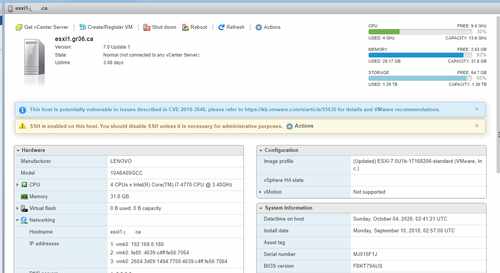
Here is the part that stings. Even if you decide to pay Broadcom, you might not be able to upgrade. This is the actual host, still running today:
$ vmware -v
VMware ESXi 7.0.1 build-17168206

$ esxcli system version get
   Product: VMware ESXi
   Version: 7.0.1
   Build: Releasebuild-17168206
   Update: 1
   Patch: 15
And here is the CPU it runs on:
$ esxcli hardware cpu list | head -8
CPU:0
   Id: 0
   Package Id: 0
   Family: 6
   Model: 60
   Type: 0
   Stepping: 3
   Brand: GenuineIntel
Family 6, Model 60 is Intel Haswell, a Xeon E3-1200 v3 from 2013. ESXi 8.0 Update 2 dropped support for Haswell, Broadwell, Sandy Bridge, and Ivy Bridge entirely. The installer refuses to run on those CPUs. Only processors with the XSAVE instruction set and newer architectures are accepted.
So the trap closes from both sides. vSphere 7.x reached end of general support in October 2025, which means my 7.0.1 host gets no more security patches. But the hardware cannot move to 8.x either. Paying for a license would buy me the right to run software my CPU is not allowed to install.
This is not a corner case. A huge number of homelab hosts are Haswell or Broadwell boxes: off-lease Dells, HP MicroServers, whitebox builds from the mid-2010s. All of them hit the same wall. VMware published a hardware compatibility list, and if your CPU is on the wrong side of it, no amount of money fixes the problem. The only way forward on that hardware is a hypervisor without a CPU allowlist, which is exactly what Proxmox is.
Pros and cons, honestly
Pros first. It costs nothing, which is the whole point. The feature set is complete without a license key: clustering, live migration, firewall, software-defined networking, ZFS, Ceph, backups. The community is large and active, which means most problems you hit have already been solved on the forum. Updates come from standard Debian repositories, so patching feels familiar if you have ever run apt.
The cons are real. The learning curve is the big one. If you lived in vSphere Client for years, Proxmox idioms feel foreign for a week or two. Storage concepts differ: you will think in terms of LVM-thin, ZFS pools, and directory storage instead of datastores. The terminology shift slows you down at first.
Enterprise support costs money, and the free repositories lag behind the enterprise ones on updates. For a homelab that does not matter. There is no exact equivalent of some VMware ecosystem tools. If you depended on a third-party product with a vSphere-only integration, check for Proxmox support before you commit.
Performance is a wash. KVM and ESXi are both mature hypervisors. You will not feel a difference in a homelab. Anyone telling you one is dramatically faster than the other is selling something.
Installing Proxmox VE
Download the ISO from proxmox.com. Write it to USB with Rufus, balenaEtcher, or dd:
sudo dd if=proxmox-ve_8.2-1.iso of=/dev/sdX bs=4M status=progress conv=fdatasync
Replace /dev/sdX with your USB device. Triple-check the device name. I have seen people wipe the wrong disk here.
Boot the installer. The prompts are straightforward: target disk, country and timezone, admin password, network configuration. Give the host a static IP. Write it down. DHCP-assigned addresses for hypervisors cause grief later.
After first boot, open https://your-ip:8006 in a browser. Accept the self-signed certificate warning. Log in as root.
Two things before you do anything else. First, the enterprise repositories will fail without a subscription key. Disable them or switch to the no-subscription repo. Edit /etc/apt/sources.list.d/pve-enterprise.list and comment out the enterprise line, then add the free repo:
echo "deb http://download.proxmox.com/debian/pve bookworm pve-no-subscription" > /etc/apt/sources.list.d/pve-no-subscription.list
apt update && apt full-upgrade -y
Second, set up your storage. If you have a spare SSD, consider ZFS for the VM pool. In the web UI, go to the node, Disks, ZFS, Create ZFS. A single-disk stripe is fine for a lab, a mirror is better if you have two disks. Name it something obvious like tank or vmstore.
Migrating VMs from ESXi
Proxmox 8.1 and later ships an ESXi import wizard. In the web UI, go to Datacenter, Storage, Add, ESXi. Enter the ESXi host address and root credentials. Proxmox connects, lists the VMs, and lets you import them directly, converting disks on the fly. For most Linux VMs this just works. Power off the VM on ESXi first. I would not trust a live import for anything running a database.
If the wizard does not fit, do it manually. The reliable path is qemu-img. Copy the VMDK files off the ESXi datastore, then convert:
qemu-img convert -f vmdk -O qcow2 source-disk.vmdk /var/lib/vz/images/100/vm-100-disk-0.qcow2
Then create a new VM in Proxmox with matching CPU, RAM, and network settings, and attach the converted disk. The VM ID in the path (100 here) must match the ID of the VM you create. Get this wrong and Proxmox will not see the disk.
For OVF exports, use the ESXi web UI or ovftool to export, then import the pieces. This is slower than the direct wizard but works when the wizard cannot reach the host.
Windows VMs need the VirtIO drivers. Download the virtio-win ISO from the Fedora project and attach it as a second CD-ROM before first boot on Proxmox. Windows will not see the VirtIO disk or network without them. Install the storage driver during setup if Windows complains about missing disks, then install the full guest agent after boot. The Proxmox guest agent (qemu-guest-agent) gives you clean shutdowns and IP reporting in the UI. Install it on Linux guests too:
apt install -y qemu-guest-agent && systemctl enable --now qemu-guest-agent
Domain controllers need care. Do not clone a domain controller and boot the copy. Migrate one DC, verify replication is healthy, then handle the second. If you run two DCs, move them one at a time and confirm each is replicating before touching the next. I have seen USN rollback from careless DC cloning, and it is not fun to fix.
Migration order
Do the easy ones first. Stateless Linux utilities, test machines, anything you can rebuild in an hour if the import goes sideways. This builds confidence in the process and shakes out driver or network issues before they matter.
Infrastructure second: DNS, DHCP, monitoring. These have dependencies, so move them as a group and verify each one before moving on. If your Proxmox host itself depends on a VM for DNS, fix that first. A hypervisor that cannot resolve names because its DNS server is mid-migration is a special kind of stuck.
Domain controllers and databases last. They are stateful, picky about time and replication, and the hardest to recover if something goes wrong. Migrate them when the process is routine, not while you are still learning the wizard.
After the move
Set up backups before you need them. Install Proxmox Backup Server as a separate VM or on separate hardware, add it as a storage target, and schedule daily backups of everything that matters. Keep at least one backup off the Proxmox host itself. A hypervisor that holds both your VMs and their only backups is a single point of failure wearing a trench coat.
Revisit your network design. Proxmox has a built-in firewall at the datacenter, node, and VM level. If you were relying on a separate firewall VM, you can simplify. VLAN-aware bridges take a few minutes to configure and replace a surprising amount of virtual switching complexity.
Clean up as you go. Migration is the best excuse you will ever get to delete the VMs you have not powered on in a year. I found over 500GB of orphaned VM directories on my old datastores: machines that were deleted from inventory but whose files were never removed, old templates, a vCenter appliance I no longer needed. None of it was missed.
Keep the old ESXi host around for a week or two after migration, powered off. If something did not come over correctly, you want the source available. Once everything has run on Proxmox for a couple of weeks without issues, wipe the old box and repurpose it.
The Broadcom acquisition ended an era. Free ESXi was the default homelab hypervisor for over a decade, and its absence leaves a gap. Proxmox VE fills it well: free, capable, and honest about what it costs. The migration takes a weekend. The peace of mind lasts longer.
💬 Comments