It was a Tuesday. The 3 AM maintenance window, a scheduled task I had written months earlier, and a file server that rebooted itself in the middle of a backup.
The task ran a preflight check before patching: Test-PendingReboot. True meant reboot, false meant stand down. It had worked for months. Then someone — me, if I am honest — added one line of logging inside the function, and the next window every server with that task rebooted whether it needed it or not.
Here is the shape of the bug:
function Test-PendingReboot {
    $rebootNeeded = $false
    # ... registry checks that set $rebootNeeded ...
    Write-Output "reboot check done"   # a debug line someone left in
    return $rebootNeeded
}

if (Test-PendingReboot) {
    Restart-Computer -Force
}
Test-PendingReboot does not return $false. It returns @("reboot check done", $false) — and a two-element array is always truthy. The if never stood a chance.
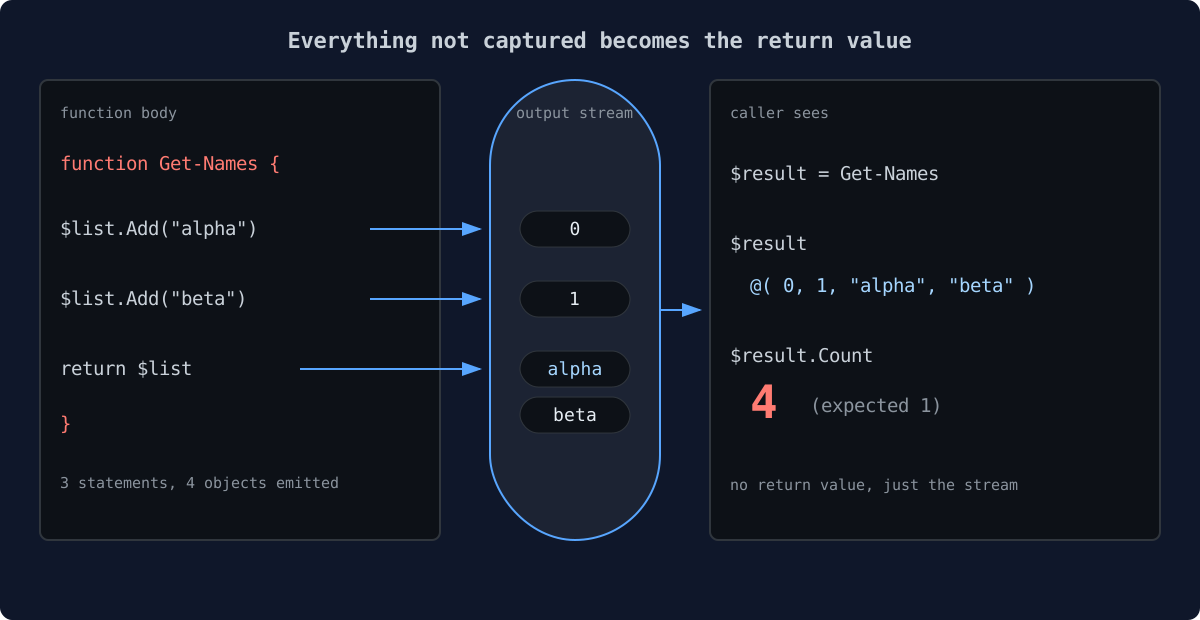
That is the whole article in one bug: in PowerShell, functions do not have return values. They have an output stream, and everything you did not swallow ends up in it.
The 30-second version
If you are in a hurry, this is all you need:
- PowerShell collects every uncaptured value produced inside a function and hands it to the caller as the return value.
return $xis not a return statement the way C# or Python mean it. It is$x(emit this) followed byreturn(exit now).- Bare
returnwith nothing after it emits nothing. It is the only honestreturnin the language. - A stray
Write-Output, a forgotten debug line, or a .NET method that returns something you did not ask for — all of it becomes part of the output.
The rest of this post is the proof, the three leaks I see most often, and the three habits that stop them.
There is no return value, only the output stream
Every PowerShell statement produces a value. Most of the time you do not notice, because the usual suspects either capture it (assignment), redirect it, or throw it away. But inside a function, any value that is not captured, redirected, or voided gets written to the output stream — stream number one, the success stream — and the caller receives the whole stream as the result.
Watch:
function Get-Thing {
    "hello"
    return "world"
}

(Get-Thing).Count   # 2
Two objects. "hello" went to the stream because nothing captured it, and return "world" first emitted "world" and then exited. The return keyword did exactly two things, in order: emit its argument, stop the function.
The bare form emits nothing at all:
function Get-One {
    "first"
    return
}

(Get-One).Count   # 1
Once you see it, you cannot unsee it. return $x is syntactic sugar for output $x, then leave. There is no separate channel for return values. There never was.
Three leaks I keep seeing
1. The .Add() that returns its index
This is the one I find in code written by someone else most often:
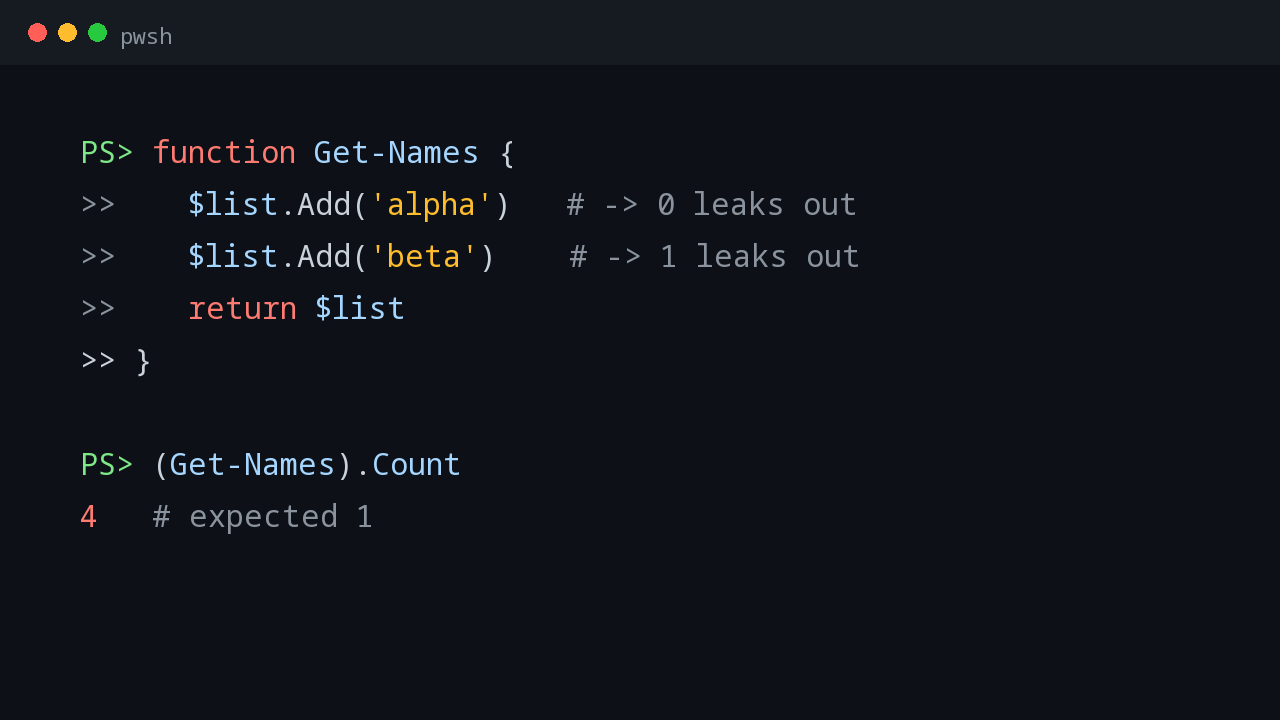
function Get-Names {
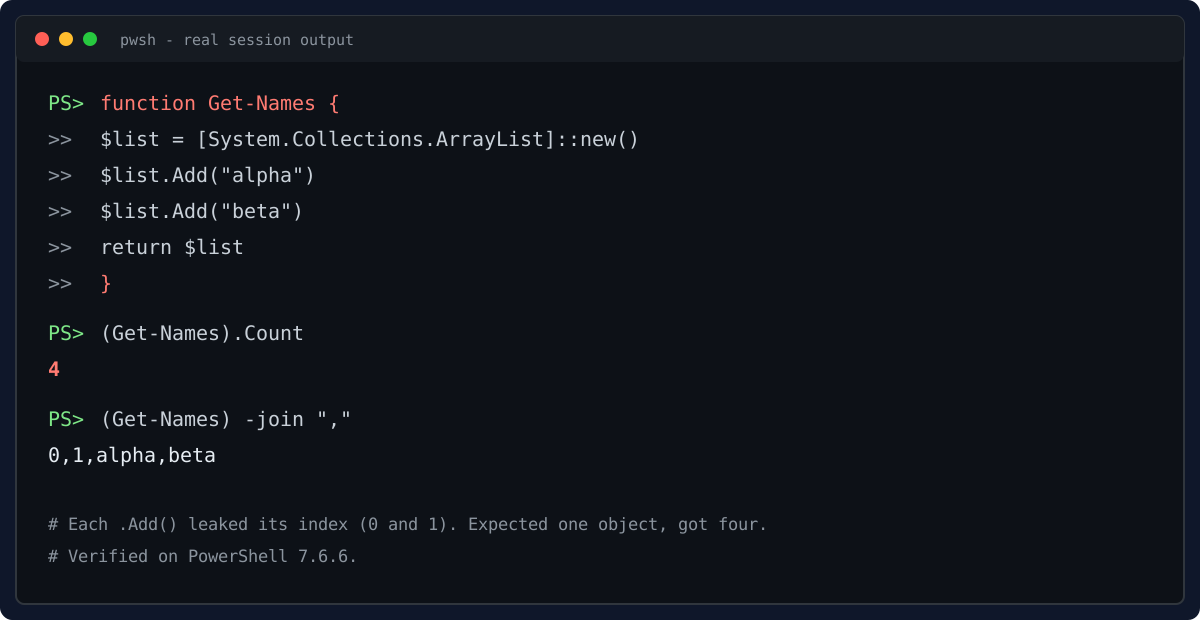
    $list = [System.Collections.ArrayList]::new()
    $list.Add("alpha")   # returns 0, and 0 goes to the output stream
    $list.Add("beta")    # returns 1, same deal
    return $list
}

(Get-Names).Count        # 4, not 1
(Get-Names) -join ","    # 0,1,alpha,beta
I ran this on PowerShell 7.6.6 to make sure I was not misremembering. Four objects: 0, 1, "alpha", "beta". Each .Add() returns the index it inserted at, and since nobody captured those return values, they joined the output stream. Then return $list unrolled the list itself into two more objects.
Note the trap inside the trap: [System.Collections.Generic.List[string]]::Add() returns void, so the generic-list version of this code is fine. It is specifically ArrayList.Add() — and a handful of other .NET methods — that hand you a value you did not ask for. StringBuilder.Append() is another one: it returns the whole builder.
function Build-Greeting {
    $sb = [System.Text.StringBuilder]::new()
    $sb.Append("hello")   # returns the StringBuilder itself
    return $sb.ToString()
}

(Build-Greeting).Count   # 2
Treat any .NET method call inside a function as guilty until proven innocent. If it returns something and you do not capture it, your caller gets it.
2. The logging line
Back to the reboot story. Write-Output writes to the output stream — that is its entire job. Using it for logging inside a function loads a second bullet into the return value:
function Get-Answer {
    Write-Output "computing..."   # goes to the output stream
    return 42
}

(Get-Answer).Count   # 2
The safe channels for chatter are the other streams. Write-Host (the information stream since v5), Write-Verbose, Write-Information, Write-Debug — none of them touch the output stream:
function Get-Answer {
    Write-Host "computing..."   # information stream, not output
    return 42
}

(Get-Answer).Count   # 1
I verified both on 7.6.6. If your function talks to the operator, it should talk on a side channel, never on the output stream.
3. The comparison that lies
The damage is not just extra objects. Downstream code misreads them in ways that do not error — it just silently does the wrong thing:
$n = @("Build detected", 26100)
$n -eq 26100     # @(26100), not $true
Against an array, -eq is not a comparison, it is a filter. It returns the matching elements. In a boolean context a non-empty result is truthy, so if ($n -eq 26100) passes — but any code doing $result -eq $expected and expecting $true or $false is now holding an array. Combined with the truthiness rule (if (@(...)) is true for any non-empty array), a polluted return value poisons every conditional downstream of it. That is how a debug line becomes a 3 AM reboot.
Three ways to plug the leaks
1. Silence it at the source
When a .NET call returns something you do not want, swallow it on the spot. Three idioms — pick one per codebase and stay consistent:
$null = $list.Add("alpha")   # my preference: reads as intent
[void]$list.Add("beta")      # cast to void
$list.Add("gamma") > $null    # redirect to null
What about piping to Out-Null? It works, but it is the slowest of the bunch — it sets up pipeline machinery for every call. I measured 20,000 iterations on 7.6.6: $null = ... took 179 ms, | Out-Null took 395 ms. In a tight loop over ten thousand AD objects, that difference is real. Save Out-Null for interactive one-liners.
2. One exit, side channels for chatter
Structure the function so exactly one statement produces output, at the end. Everything else is assigned, voided, or sent to a side stream:
function Get-Names {
    [CmdletBinding()]
    param()
    $list = [System.Collections.ArrayList]::new()
    Write-Verbose "Building name list."
    $null = $list.Add("alpha")
    $null = $list.Add("beta")
    return $list
}
The [CmdletBinding()] is not decoration — it gives you -Verbose for free, which is where the chatter belongs.
3. Harden the caller, a little
You cannot fix every function you will ever call, including code written by someone else. Where the contract of a function matters, verify the shape, not just the truthiness:
$result = Get-Names
if ($result.Count -eq 1) { ... }   # shape check, not truthiness
And when you write the function, test it the way the stream sees it: (My-Function).Count and (My-Function).GetType(). If either surprises you, something leaked.
The pre-ship checklist
Before a function leaves my editor:
- Every .NET method call: does it return something? (
.Add(),.Append(),.Remove()returns bool — check each one.) - No bare
Write-Outputfor logging. Diagnostics go to Verbose, Information, or Host. - No leftover debug lines. (The reboot story. Every time.)
- One deliberate output statement, at the end.
- Tested with
(f).Count— and with zero, one, and many results, because$null, scalar, and array all behave differently downstream.
The output stream is a feature, not a bug — it is what makes the pipeline compose. But a function boundary is a contract, and the stream does not respect contracts on its own. return will not save you. Nothing will, except knowing that in this language, everything you did not swallow is what you returned.
Next up in this series: why try/catch did not catch your error — the terminating versus non-terminating split, and the decision tree for $ErrorActionPreference.
💬 Comments