Running git status in a repository that was working perfectly fine yesterday and getting hit with this:
fatal: bad object HEAD
fatal: 'git status --porcelain=2' failed in submodule web/hugo/hugoweb/h2
The error appears as two fatal lines: the first on the main repository and the second propagating into a submodule.
This is one of those errors that feels worse than it is. The repository is not gone. The commits are almost certainly intact. What has failed is Git’s ability to resolve the name HEAD to a valid commit object, which breaks nearly every Git command that needs to know what the current state of the repository is.
Up front
The fatal: bad object HEAD error means Git cannot dereference HEAD to a real commit object. The first thing to check is not the HEAD file itself — run Get-Content .git\HEAD -Raw | Format-Hex and confirm it ends with byte 0A (Unix newline, displayed as ♦ in PowerShell’s ASCII column). That is normal and correct. If the HEAD file is healthy, the real problem is one step further: the branch ref file (e.g. .git\refs\heads\dev6) is missing or empty, or the commit object it points to was deleted from the object store. Recover the last good commit SHA from git reflog or directly from .git\logs\HEAD, then write it back into the branch ref file.
Why git status throws bad object HEAD
Every Git repository has a file at .git/HEAD. That file normally contains one of two things: a symbolic ref like ref: refs/heads/main that points to a branch, or a raw 40-character SHA-1 hash when the repository is in a detached-HEAD state.
When Git runs git status, it resolves HEAD through this chain:
- Reads
.git/HEADto find the branch name or SHA. - Reads the branch file (e.g.
.git/refs/heads/main) to get the commit SHA. - Reads the commit object from the object store.
- Compares the tree of that commit against the index.
If any link in that chain is broken, Git aborts with fatal: bad object HEAD. The second line in the screenshot — the submodule failure — is a direct consequence: Git was trying to recurse into the submodule to run the same status check, and the parent repository’s broken HEAD prevented that from completing cleanly.
On Windows specifically, several things can break this chain that are less likely on Linux:
- CRLF corruption in
.git/HEAD: Some editors, Windows clipboard operations, or misconfigured Git hooks can write\r\nline endings into.git/HEAD. Git reads the file verbatim and treats the trailing\ras part of the ref name, which does not match any file on disk. - Antivirus or search indexer interference: Windows Defender, third-party AV, and even Windows Search can open and lock
.gitfiles during a Git write operation, leaving them truncated or zero-length. - Interrupted pack-file compaction: Running
git gcor a large fetch that was killed mid-way can leave the object store in a state where the expected commit object does not exist yet. - OneDrive or network drive sync conflicts: Repositories stored on a synced folder can have
.gitfiles replaced with conflict copies or zero-byte stubs if two devices write simultaneously. - File system case collisions: Older Windows NTFS volumes and some network shares have quirks around case sensitivity in
.git/refs/that can cause a branch ref file to be missing even though the HEAD points to it.
The submodule error in the screenshot is not a separate problem in the submodule itself. It is Git reporting that it could not complete the parent status command cleanly enough to descend into web/hugo/hugoweb/h2.
Step 1: Inspect the HEAD file
Open a PowerShell window in the repository root and read the raw bytes of the HEAD file:
Get-Content .git\HEAD -Raw | Format-Hex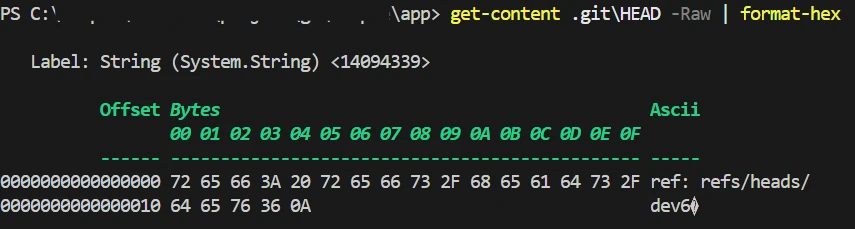
The hex dump shows the HEAD file contains ref: refs/heads/dev6 followed by byte 0A. The ♦ in the ASCII column is just how PowerShell renders 0A (Unix line feed) — it is not a corruption.
Reading the actual bytes from the screenshot:
00000000  72 65 66 3A 20 72 65 66 73 2F 68 65 61 64 73 2F  ref: refs/heads/
00000010  64 65 76 36 0A                                    dev6♦
The file decodes to ref: refs/heads/dev6 + 0A. That is exactly what a healthy HEAD file looks like. The 0A byte is a Unix newline (LF). PowerShell’s Format-Hex displays non-printable ASCII control characters as ♦ in the ASCII column — it does not mean there is a bad character in the file.
If your HEAD ends with 0D 0A instead of just 0A, that is the problem. 0D 0A is a Windows CRLF line ending. Git reads the file verbatim, so the branch name it extracts becomes dev6\r (with a literal carriage return), which matches nothing on disk. Fix it:
# Replace 'dev6' with your actual branch name from the hex dump
[System.IO.File]::WriteAllText(
    (Resolve-Path ".git\HEAD").Path,
    "ref: refs/heads/dev6`n"
)
If your HEAD ends with 0A as shown in the screenshot above, the HEAD file is not the problem. Move on to Step 1b.
Step 1b: Check the branch ref file
The HEAD file is healthy and points to refs/heads/dev6. Git now needs to read .git\refs\heads\dev6 (or find the branch in .git\packed-refs) to get the commit SHA. Check both:
# Check if the loose ref file exists
Test-Path ".git\refs\heads\dev6"
Get-Content ".git\refs\heads\dev6" -ErrorAction SilentlyContinue

# Check packed-refs as a fallback
Select-String "dev6" ".git\packed-refs" -ErrorAction SilentlyContinue
The branch dev6 is present in .git\packed-refs at line 3, mapped to commit SHA 475f855fb3cc69ef7e6ab005019124f0dc22f60a. The ref itself is not missing — the commit object is.
In this case the branch ref resolves correctly to 475f855fb3cc69ef7e6ab005019124f0dc22f60a. Git’s next step is to load that commit object from the object store. If that object is missing or corrupted, Git cannot complete the resolution and throws fatal: bad object HEAD. Three possible outcomes from the commands above:
| Result | Meaning | Next step |
|---|---|---|
| Loose ref file exists with a 40-char SHA | Ref is fine; commit object is probably missing | Run git fsck --full (Step 2) |
| Loose ref file is missing but packed-refs has the branch | Ref is packed; commit object is probably missing | Run git fsck --full (Step 2) |
| Neither exists | Branch ref was deleted or never written | Recover from reflog (Step 3) |
Because packed-refs returned a valid entry here, the next step is to verify whether that specific commit object — 475f855f... — actually exists in the object store.
Run Git’s built-in consistency checker against the full object store:
git fsck --fullThis command walks every object in .git/objects/ and every pack file in .git/objects/pack/, verifying SHA checksums and internal references. It will print lines like:
Checking object directories: 100% (256/256), done.
Checking connectivity: done.
If objects are missing or corrupted, you will see output like:
error: object file .git/objects/ab/cdef1234... is empty
missing blob ab/cdef1234...
dangling commit 9f83a1...
Note the SHA hashes from any missing or error lines. A dangling commit is not an error — it just means a commit that nothing currently points to, which is normal after rebases or resets.
Also check whether the branch ref file exists:
# Replace 'main' with your branch name from Step 1
Test-Path ".git\refs\heads\main"
Get-Content ".git\refs\heads\main" -ErrorAction SilentlyContinue
If the file is missing or empty, move to Step 5 to recover the SHA manually.
Step 3: Recover from the reflog
Git keeps a reflog — a local history of where every ref has pointed — in .git/logs/. Even if HEAD and the branch ref are broken, the reflog may still contain the last good commit SHA.
git reflogIf this works, you will see output like:
9f83a1e (HEAD -> main) HEAD@{0}: commit: fix typo in config
3b2c10d HEAD@{1}: commit: add nginx config
a1f4d9e HEAD@{2}: pull: Fast-forward
The leftmost SHA on each line is a commit hash. Take the most recent one (the top line, or HEAD@{1} if HEAD@{0} is the one that was corrupted) and reset HEAD to it:
# Use the SHA from your reflog output
git reset --hard 9f83a1e
After the reset, run git status again. If the working tree is clean or shows only expected modifications, the recovery is complete. Commit or stash any unexpected changes you find.
Step 4: Repair with git fsck
If git reflog itself fails because the HEAD is too broken for Git to start, you can read the reflog file directly from disk:
# Read the HEAD reflog directly
Get-Content ".git\logs\HEAD"
Each line in .git/logs/HEAD follows the format:
<old SHA> <new SHA> <author> <timestamp> <message>The rightmost SHA on the most recent line is the last commit HEAD pointed to. Copy that SHA and use it in the next step.
You can also search the loose object directory for recent objects to identify candidates:
Get-ChildItem ".git\objects" -Recurse -File |
    Where-Object { $_.Name.Length -eq 38 } |
    Sort-Object LastWriteTime -Descending |
    Select-Object -First 20 |
    ForEach-Object { $_.Directory.Name + $_.Name }
This lists the 20 most recently written loose objects. Each result is a 40-character SHA. You can inspect individual objects with git cat-file -t <sha> to see whether it is a commit, tree, or blob.
Step 5: Recover the HEAD SHA manually
If you have a valid commit SHA from the reflog file or from git cat-file, write it directly into both the branch ref and HEAD:
$sha = "9f83a1e4d2c3b1a0f9e8d7c6b5a4f3e2d1c0b9a8"  # your commit SHA

# Write the SHA to the branch ref
[System.IO.File]::WriteAllText(
    (Resolve-Path ".git\refs\heads\main").Path,
    "$sha`n"
)

# Make sure HEAD points to the branch (not detached)
[System.IO.File]::WriteAllText(
    (Resolve-Path ".git\HEAD").Path,
    "ref: refs/heads/main`n"
)
Then verify:
git log --oneline -5
git status
You should see your recent commits and a normal status output. If git log shows the correct history, the repository is healthy.
Step 6: When the submodule also fails
After fixing the parent HEAD, run:
git submodule statusThere are two distinct errors you may see here, and they require different fixes.
No submodule mapping found in .gitmodules
fatal: no submodule mapping found in .gitmodules for path 'web/hugo/hugoweb/h2'This error means Git’s index records a submodule at web/hugo/hugoweb/h2 but .gitmodules has no entry for that path. The submodule reference is orphaned. This is not a cascade from the parent HEAD problem — it is a separate issue that existed before the HEAD corruption, or was exposed by it.
First, confirm what .gitmodules actually contains:
Get-Content .gitmodulesIf the path web/hugo/hugoweb/h2 is genuinely missing from .gitmodules, you have two options:
Option A — Remove the orphaned index entry (if you no longer need the submodule):
git rm --cached web/hugo/hugoweb/h2This removes the submodule from the index without touching any files on disk. Commit the result:
git commit -m "remove orphaned submodule index entry for web/hugo/hugoweb/h2"Option B — Re-register the submodule in .gitmodules (if you want to keep it):
Open .gitmodules and add the missing entry. The format is:
[submodule "web/hugo/hugoweb/h2"]
    path = web/hugo/hugoweb/h2
    url = https://github.com/yourorg/yourrepo.git
Replace the URL with the actual remote. Then initialize and pull the submodule:
git submodule update --init web/hugo/hugoweb/h2Commit the updated .gitmodules:
git add .gitmodules
git commit -m "restore .gitmodules entry for web/hugo/hugoweb/h2"
Other submodule status prefixes
If git submodule status returns without the fatal error but shows a prefix character, the meaning is:
| Prefix | Meaning | Fix |
|---|---|---|
- |
Not initialized | git submodule update --init --recursive |
+ |
Checked-out SHA differs from parent’s recorded SHA | git submodule update --recursive |
U |
Merge conflict inside the submodule | Resolve conflicts inside the submodule directory |
| (none) | Submodule is clean and up to date | No action needed |
If git submodule status completes without a fatal error after the parent HEAD is repaired, a plain git submodule update --init --recursive is usually enough to bring all submodules into the correct state.
Preventing HEAD corruption on Windows
A few practices reduce the chance of this happening again:
Exclude .git from antivirus real-time scanning. Windows Defender and third-party AV products can hold locks on files inside .git/ for several seconds after Git writes them. Adding the .git folder to the AV exclusion list eliminates this risk without meaningfully reducing security, since .git contains only version-controlled source files.
In Windows Security, go to Virus & threat protection → Manage settings → Exclusions → Add or remove exclusions and add the full path to each repository root, for example C:\repos\myproject\.git.
Do not store repositories on OneDrive or SharePoint synced folders. The sync client can replace .git files with conflict copies or lock them during a cloud upload. Keep Git repositories on a local NTFS drive or in WSL and use git push for remote backups.
Use Git for Windows 2.43 or later. Recent releases include additional Windows-specific hardening for file locking during pack-file writes. Check your version with:
git --versionSet core.fsync = all for critical repositories. This tells Git to flush all .git files to disk before marking an operation complete, reducing exposure to truncated writes after a power loss or forced shutdown:
git config core.fsync allBack up .git/refs/ and .git/packed-refs periodically. A simple scheduled task that copies these two locations to a separate folder takes under a second and gives you a manual recovery point if the object store gets damaged.
Summary
The fatal: bad object HEAD error on Windows is almost always recoverable without losing any commits. The typical causes are CRLF corruption in .git/HEAD, antivirus interference during a write, or an interrupted pack operation. The repair path is: run Get-Content .git\HEAD -Raw | Format-Hex to confirm the HEAD file is intact (byte 0A at the end is normal), check the branch ref in .git\refs\heads\ or packed-refs, run git fsck --full to assess the object store, read the reflog to find the last good commit SHA, and reset or rewrite the branch ref to point to it.
For the submodule error, check git submodule status after the parent HEAD is repaired. If you see fatal: no submodule mapping found in .gitmodules, the submodule is orphaned in the index — remove it with git rm --cached or restore the .gitmodules entry and re-initialize. That error is independent of the HEAD problem and requires its own fix.
Once you have confirmed git status and git log return normal output, add the repository’s .git folder to your antivirus exclusion list and move the repository off any synced folder to avoid a recurrence.
For related Git setup and configuration, see How to Install Git on Windows and Linux and How to Build a Local Git Server on Ubuntu.
FAQ
What causes “fatal: bad object HEAD” in git? A corrupted HEAD reference — usually from an interrupted write, disk issue, or crashed process during a git operation.
Can I recover from bad object HEAD without losing work?
Usually yes. Check .git/refs/heads/ for branch refs, use git reflog to find the last good commit, and reset HEAD to it. Uncommitted changes in the working tree are typically unaffected.
Does this happen more often on Windows? It can, due to antivirus file locking or abrupt process termination interfering with git’s file writes.
💬 Comments