Sign Up and Earn Money on Toloka
Last updated: May 2026
Are you looking for an easy, flexible, and low-pressure way to earn extra money online?
Toloka, by Toloka AI, is one of the most beginner-friendly platforms available right now.
Toloka is a global crowdsourcing platform where people complete simple microtasks that help train AI models. Tasks may include image labeling, data categorization, content moderation, surveys, search evaluation, and more.
No special skills are required to start, and you can work from your phone or computer whenever you have free time.
In this guide, I’ll walk you through how to sign up, complete training tasks, start earning, understand realistic part-time and student income, and use practical tips to avoid frustration.
Why Toloka Is Great for First-Year Students
Toloka is a good starting platform for students because it offers:
- Easy entry: You do not need advanced experience to begin.
- Website and mobile app access: You can work from a computer or phone.
- Flexible schedule: It fits around classes, studying, and exams.
- AI-related exposure: Tasks can introduce you to data labeling and AI training work.
- Low-risk setup: You should not need to pay to join.
- Fast start: You can usually begin training tasks soon after registration.
Many students use Toloka as their first online earning platform because it has a lower barrier to entry than platforms such as Prolific, Outlier, or Appen.
Step-by-Step: How to Sign Up for Toloka
Step 1: Visit the Official Website
Go to the official Toloka website:
Look for a button such as:
- Register <– click here to register.
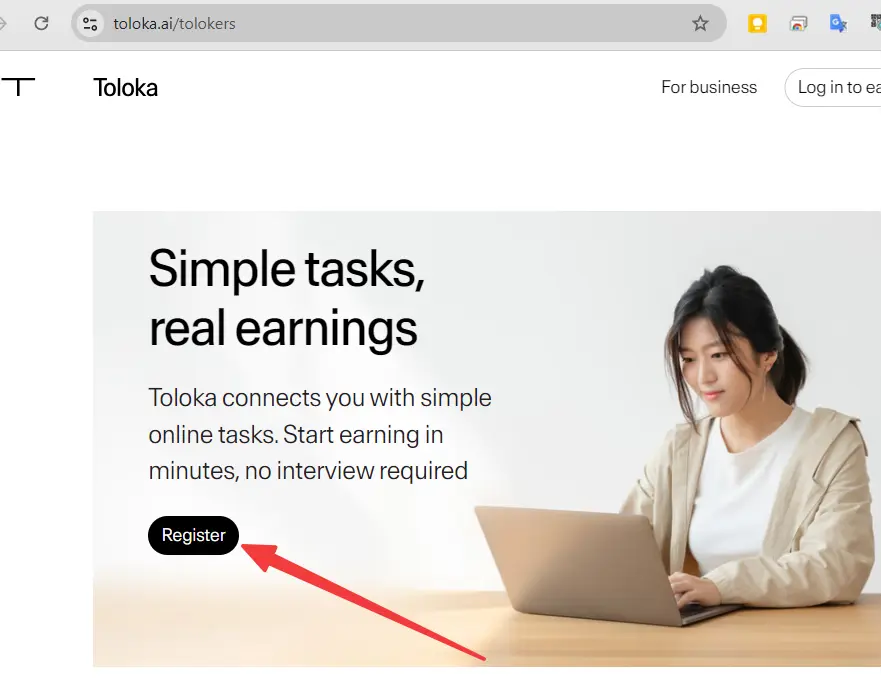
The exact wording may change, but the signup option should be easy to find.
Step 2: Create Your Account
You can usually sign up using:
- Google account
- Facebook account
- Linkedin account
- Email address
- Other supported social accounts
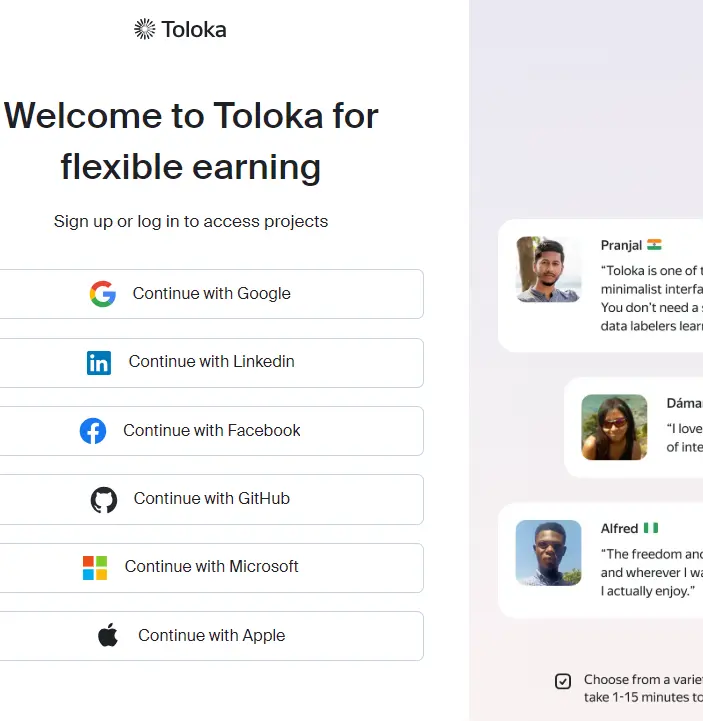
Using Google is often the fastest option.
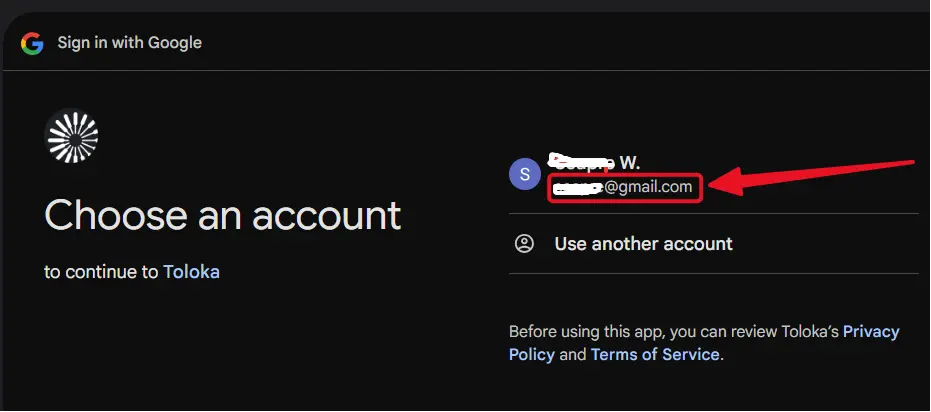
If you already have a gmail account and sign in on the browser, you can use it to sign up for Toloka. Click on the gmail accunt, and then click on “Continue” button to sign up with your gmail account.
Step 3: Complete Registration Details
During registration, you may be asked to provide:
- your phone number, click send code, then check your phone and enter the code to verify it.
- get the code from your phone, and enter the code to Confirm.
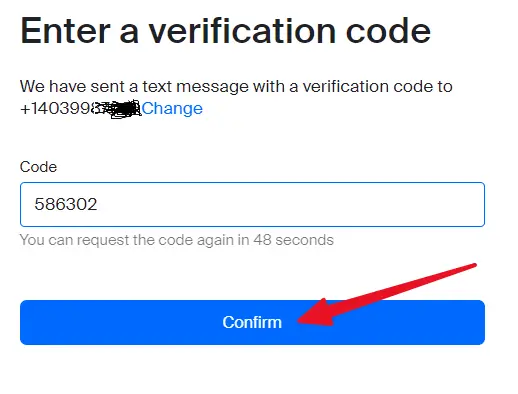
- Enter you personal information, in order to veriry you are a real human, not a bot.
- *** real first and last name
- *** Country
- *** Date of birth, 18+ only. You must be at least 18 years old to use Toloka.
- *** ticked all the agreements, as showing on the image below.
- *** Click on the “Continue” button to continue.
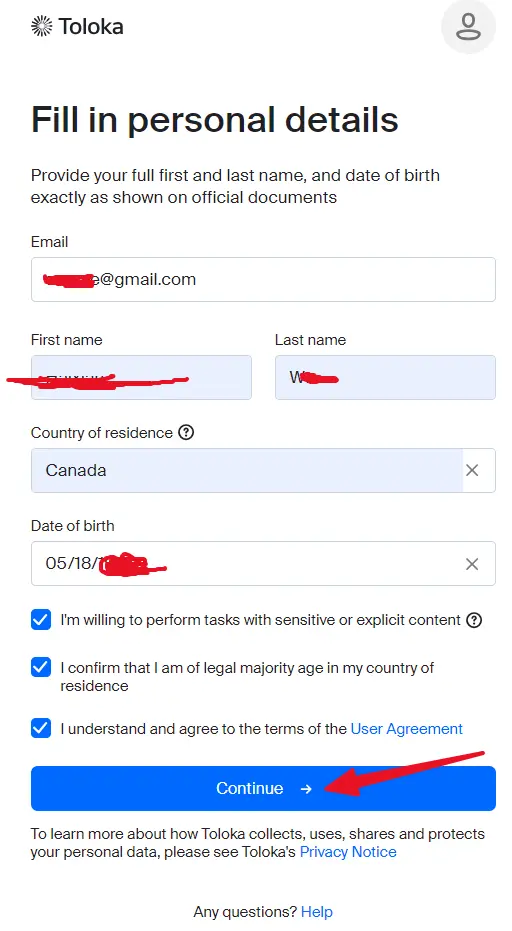
Use accurate information. Fake details can cause problems later, especially when setting up withdrawals.
Step 4: Fill Out Your Profile
Your profile helps Toloka match you with available tasks.
Complete these sections carefully:
- Education
- Languages you speak
- Skills and interests
- Devices you use
- Country and region
For example, if you are a first-year Computer Science student, mention that in your education or profile details.
A complete profile may help you access more task categories.
Step 5: Complete Training Tasks
After registration, you will usually see short training tasks.
These are often unpaid at first, but they teach you how to complete real paid tasks correctly.
To pass training tasks:
- Read the instructions carefully.
- Complete the examples before starting.
- Focus on accuracy.
- Do not rush.
- Try training tasks from different categories.
Most training tasks are short and may take around 5–15 minutes each.
Once you pass training for a task category, paid tasks may unlock.
Step 6: Start Doing Paid Tasks
After you complete training, go to the task list and choose available paid tasks.
Before starting any new task type:
- Read the full instructions.
- Check the examples.
- Understand the quality requirements.
- Start slowly until you understand the task.
- Prioritize accuracy over speed.
Good accuracy can help you maintain access to more tasks.
Types of Tasks on Toloka
| Task Type | Difficulty | Typical Pay | Good for Students? | Description |
|---|---|---|---|---|
| Image and Video Labeling | Easy | $3–$8/hr | Yes | Tag objects or classify images and videos. |
| Content Moderation | Easy–Medium | $4–$9/hr | Yes | Check content for policy or quality issues. |
| Search Evaluation | Medium | $5–$10/hr | Good | Rate search results or judge relevance. |
| Text Categorization | Easy | $3–$7/hr | Yes | Sort, label, or classify text. |
| Surveys and Data Collection | Easy | $2–$6/hr | Quick cash | Answer questions or provide simple data. |
| Audio and Voice Tasks | Medium | Varies | If interested | Complete transcription, recording, or audio review tasks. |
As a Computer Science student, you may enjoy data labeling and AI training tasks because they give you a light introduction to how AI datasets are built.
Realistic Earnings for University Students in 2026
Toloka earnings depend on your location, task availability, speed, accuracy, and the number of training tasks you complete.
Realistic beginner estimates may look like this:
- Beginners: $3–$7 per hour
- After 1–2 weeks: $5–$10 per hour
- With good skills and ratings: $8–$12+ per hour on better tasks
- Working 8–15 hours per week: $100–$400+ per month
Your earnings may depend on:
- How many trainings you complete
- Your accuracy
- Your speed
- Task availability in Canada
- Time of day
- Task category
Payouts are usually in USD and may be available through Payoneer, depending on your region and account setup.
First Week Strategy: Get Small Wins Fast
Your first goal should be to build momentum.
Here is a simple first-week plan:
Day 1
- Sign up.
- Complete your profile.
- Complete as many available trainings as possible.
- Spend 1–2 focused hours learning the platform.
Day 2–7
- Spend 30–90 minutes per day on easy tasks.
- Focus on high-volume beginner tasks.
- Track your time and earnings.
- Avoid rushing through unfamiliar task types.
First Goal
Aim to reach your first small payout within 7–14 days.
Even a small first payment can help you stay motivated.
Pro Tips for First-Year CS Students
Use Both the Website and Mobile App
Use the website for more detailed tasks and the mobile app for quick tasks while commuting or between classes.
Check the Task List Often
Good tasks can disappear quickly.
Check multiple times a day when possible, especially:
- Morning
- Afternoon breaks
- Evening
- Weekends
Prioritize Accuracy
Accuracy matters more than speed.
High-quality work may help you:
- Keep access to tasks
- Unlock better tasks
- Improve your rating
- Earn more consistently
Track Your Earnings
Use a simple spreadsheet to record:
- Date
- Task type
- Time spent
- Amount earned
- Effective hourly rate
- Notes about task difficulty
This helps you identify which tasks are worth your time.
Treat Toloka as AI Training Experience
Toloka can give you light exposure to:
- Data labeling
- AI training workflows
- Search relevance
- Text classification
- Content moderation
If you are a Computer Science student, this can be a useful beginner experience to mention carefully on your resume or LinkedIn.
Avoid Burnout
Toloka is best treated as a side activity.
Do not let it interfere with:
- Classes
- Assignments
- Exams
- Sleep
- Long-term career goals
A small consistent schedule is better than trying to work too many hours at once.
Pros and Cons of Toloka
Pros
- Easy to start
- Beginner-friendly tasks
- Mobile app available
- Flexible schedule
- Useful exposure to AI data work
- Low initial barrier to entry
- Payout options available in many regions
Cons
- Pay starts relatively low
- Task availability can fluctuate
- Some tasks are repetitive
- Withdrawal fees may apply depending on payout method
- Better tasks may require training and accuracy history
Common Mistakes New Users Make
Avoid these common beginner mistakes:
- Skipping profile details
- Rushing through training tasks
- Not reading instructions carefully
- Checking the platform only once a week
- Using VPNs during signup or tasking
- Giving up before building a task history
- Focusing only on speed instead of accuracy
Treat your first two weeks as a learning period.
Is Toloka Safe and Legitimate?
Toloka is a well-established crowdsourcing and AI data platform.
It was originally associated with Yandex and now operates as a global AI data platform focused on helping companies improve machine learning and artificial intelligence systems.
For beginners, Toloka can be a relatively low-pressure way to try online microtask work.
That said, always protect your account and personal information:
- Use the official website.
- Do not buy or sell accounts.
- Do not use a VPN to fake your location.
- Do not share your login details.
- Read payout and verification requirements carefully.
Frequently Asked Questions
Is Toloka available in Canada?
Yes, Toloka is generally available in Canada.
Do I need to upload a passport or ID immediately?
Usually, heavy identity verification is not required at the very beginning. However, verification may be requested later, especially for withdrawals or account security.
Can a first-year university student join?
Yes. Many students use Toloka because it is beginner-friendly and flexible.
How long does it take to receive the first payout?
If you work consistently and complete enough paid tasks, you may reach your first payout within 7–14 days.
Is there a minimum payout?
Toloka usually allows relatively small withdrawals, but the exact minimum may depend on the payout method available in your country.
Can I use Toloka on mobile?
Yes. Toloka has a mobile app for Android and iOS, and many tasks can be completed from a phone.
For more detailed tasks, a laptop or desktop may still be better.
Is Toloka a scam?
No. Toloka is a legitimate microtask and AI data platform.
However, avoid unofficial websites, paid “approval” services, and anyone asking you to buy or rent an account.
Final Thoughts
Toloka is a strong starting platform for first-year university students who want a simple and flexible way to earn money online.
It is especially useful if you want to avoid complicated onboarding and start with smaller, easier tasks.
For Computer Science students, Toloka can also provide a light introduction to AI data work, including labeling, categorization, and evaluation tasks.
Start small, complete your trainings, focus on accuracy, and stay consistent for the first two weeks. Once you receive your first few payments and understand how microtask platforms work, you can consider expanding to other platforms such as Clickworker, Prolific, Appen, or Outlier.
Ready to begin?
If you successfully sign up or complete your first tasks, feel free to share your experience in the comments below. Your experience may help other students get started.
Good luck with your studies and your first online earnings!